Symptoms
-
It is not posible to issue or renew Let's Encrypt SSL/TLS certificate. The following error appears in Plesk or in a mail sent to the user's mailbox:
Error: Could not issue a Let's Encrypt SSL/TLS certificate for example.com.
Authorization for the domain failed.
Details Invalid response from https://acme-v02.api.letsencrypt.org/acme/authz/9_fD4pJYnd6o4DNUxbG0WNtYOOm-G6TeHcz8TN1K9f4. Details: Type: urn:ietf:params:acme:error:unauthorized
Status: 403
Detail: Incorrect TXT record "Rq5AN5tnNTHnUNfh2byBWzDZNePjIOcSJDMJYK0ku6A" found at _acme-challenge.example.com -
Plesk is not the master of the zone, external servers are used:
# dig NS example.com +short
ns1.server.com
ns2.server.com -
DNS extension like "Amazon Route 53" is used.
Cause
Local DNS service is stopped in Tools & Settings > Services Management.
If this service is stopped then the TXT record for _acme-challenge will not be generated automatically.
Resolution
-
Start the DNS service in Tools & Settings > Services Management.
-
Go to Domains > example.com > SSL/TLS Certificates
-
Click on Reissue certificate.
-
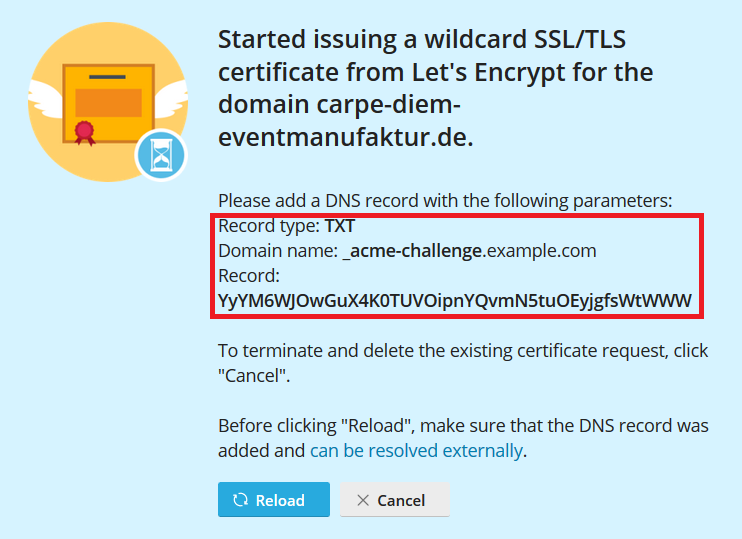
Once the following image is shown, double check if the TXT record resolves externally. This can be checked via ssh with the command
dig TXT _acme-challenge.example.com +short:
- If it does not resolve, add the record to the external DNS server, removing other existing acme-challenge records from there.
-
Get back to Plesk screen and click Reload button