Symptoms
- Websites on Plesk server are slow or not available, sending emails via PHP script fails with:
500 external server error
- Domains > exemple.com > Logs or
/var/www/vhosts/example.com/logs/error_logshow:mod_fcgid: ap_pass_brigade failed in handle_request_ipc function, referer: http://www.example.com/index.php
Cause
The connection is being reset due to the FcgidMaxRequestsPerProcess limit has been reached. The parameter was previously defined in the web configuration:
- On RedHat/CentOS/CloudLinux:
# grep FcgidMaxRequestsPerProcess /etc/httpd/conf.d/fcgid.conf /var/www/vhosts/system/example.com/conf/vhost.conf /var/www/vhosts/system/example.com/conf/httpd.conf
- On Ubuntu/Debian:
# grep FcgidMaxRequestsPerProcess /etc/apache2/mods-enabled/fcgid.conf /var/www/vhosts/system/example.com/conf/vhost.conf /var/www/vhosts/system/example.com/conf/httpd.conf
Resolution
Solution for one particular domain
- Log in to Plesk.
- Go to Domains > example.com > Apache & nginx Settings > Additional Apache directives.
- Increase the
FcgidMaxRequestsPerProcessparameter value in Additional directives for HTTP and Additional directives for HTTPS fields:<IfModule mod_fcgid.c>
FcgidMaxRequestsPerProcess 500
</IfModule>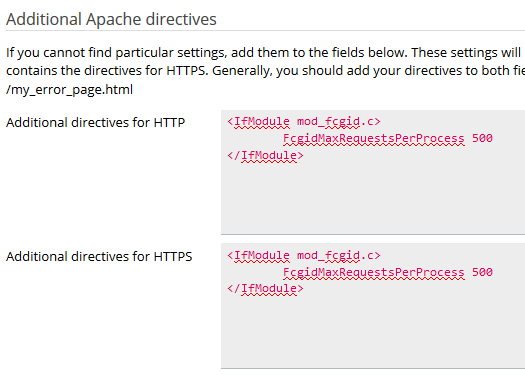
Solution for all domains on the server
- Connect to the server via SSH.
- Open
/etc/httpd/conf.d/fcgid.conf(on RedHat/CentOS/CloudLinux) or/etc/apache2/mods-enabled/fcgid.conf(on Ubuntu/Debian) using "vi"; - Increase the value of
FcgidMaxRequestsPerProcessparameter, e.g. to 500:<IfModule mod_fcgid.c>
FcgidMaxRequestsPerProcess 500
</IfModule> - Reload Apache configuration:
- On RedHat/CentOS/CloudLinux:
# systemctl reload httpd
- On Ubuntu/Debian:
# systemctl reload apache2
- On RedHat/CentOS/CloudLinux:
- If it does not help, set
FcgidOutputBufferSize 0in the same configuration file and reload Apache again.
