Question
How to restore email accounts from a Plesk backup?
Answer
-
Go to Domains > example.com > Backup Manager.
-
Click on a backup from which you want to restore mail data.
-
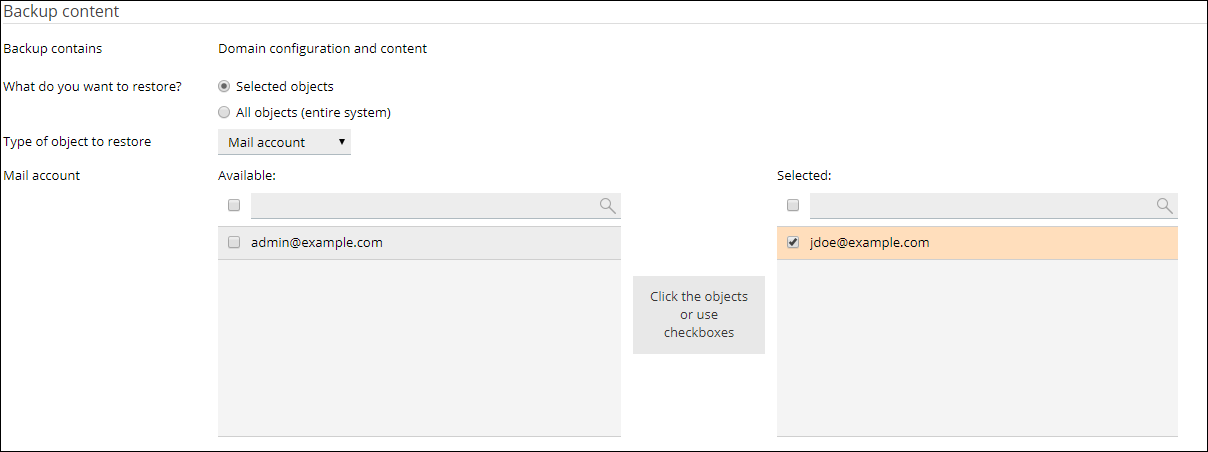
For What do you want to restore? select Selected objects.
-
Set the type of object - Mail account.
-
Select an email account from the list and click on it to move to the selected list.
-
Click OK to start the restoration.
-
Connect to the server via SSH.
-
List all available Plesk backups:
# /usr/local/psa/admin/bin/pmm-ras --get-dump-list | grep .xml:
-
Use the
pleskrestoreutility to restore the mail data.Example:
# /usr/local/psa/bin/pleskrestore --restore /var/lib/psa/dumps/domains/example.com/backup_info_2301030133.xml -only-mailnames list:[email protected]
where:
-
backup_info_2301030133.xml - backup name from step 2
-
[email protected] - email account which is going to be restored
To learn more about the
pleskrestoreutility options, run the command:# /usr/local/psa/bin/pleskrestore --help
-
