Question
How to install a local mail server or switch between mail servers in Plesk for Linux?
Answer
Plesk allows to install the following mail components and switch between them using Plesk Installer:
SMTP servers
- Postfix
- QmailIMAP/POP3 servers
- Dovecot
- Courier
Note: Changing SMTP server does not affect mailboxes, but changing IMAP server may affect mailboxes. Visit this KB article to learn more about potential issues.
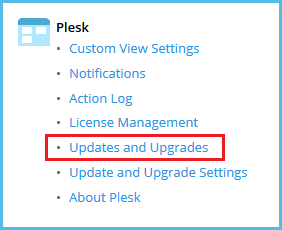
Go to Tools & Settings and click Updates and Upgrades.
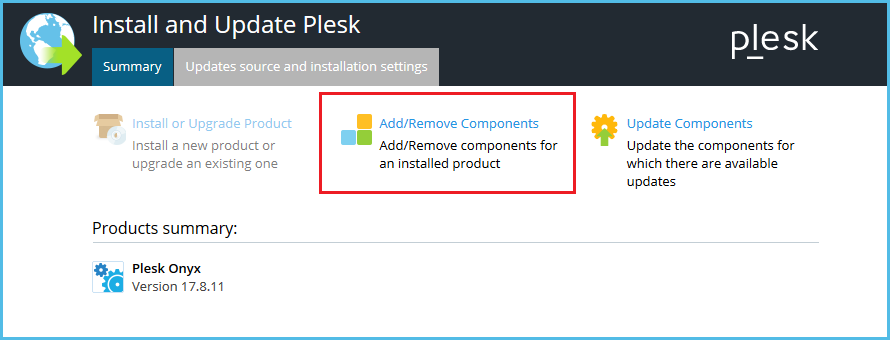
On the Updates and Upgrades page, click Add/Remove Components.
On the Add/Remove Components page, expand Mail Hosting and select required mail components:
SMTP servers
- Postfix (default)
- QmailIMAP/POP3 servers
- Dovecot (default)
- Courier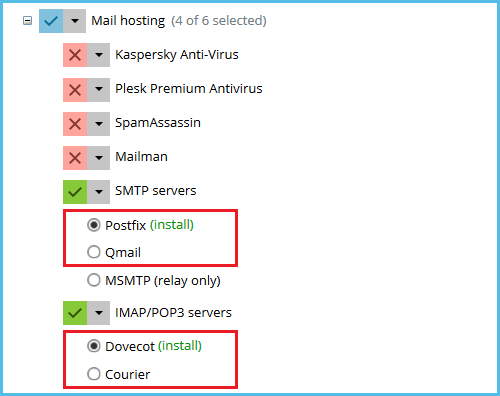
Click Continue to begin the installation.
Connect to a Plesk server via SSH.
Start Plesk Installer:
# plesk installer
Proceed to the "Main components list for Plesk" menu.
In the "Main components list for Plesk" menu, expand "Mail hosting".
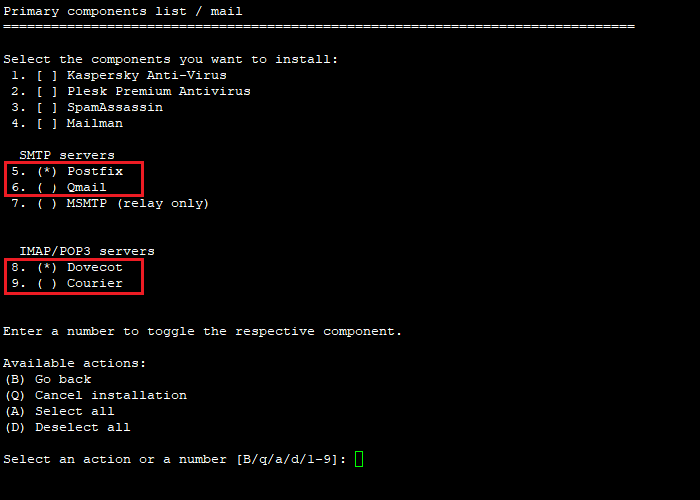
In the "Primary components list/mail" menu, select required mail components using their numbers:
SMTP servers
- Postfix (default)
- QmailIMAP/POP3 servers
- Dovecot (default)
- Courier
Go back to the "Main components list for Plesk" menu.
Begin the installation.
Additional Information
Instructions for Plesk on Windows Server are available in this KB article.
To configure external SMTP server in Plesk, visit this KB article.
