Skip to content
  • Solutions
    By Role
    • For Developers
    • For Content Managers
    • For Agencies
    • For IT Admins
    • For Web Hosters
    • For Developers
    • For Content Managers
    • For Agencies
    • For IT Admins
    • For Web Hosters
    By Infrastructure
    • Overview
    • AWS
    • Microsoft Azure
    • Alibaba Cloud
    • Google Cloud Platform
    • Vultr
    • Overview
    • AWS
    • Microsoft Azure
    • Alibaba Cloud
    • Google Cloud Platform
    • Vultr
    • Digital Ocean
    • Linode
    • Upcloud
    • Oracle
    • OVH
    • Digital Ocean
    • Linode
    • Upcloud
    • Oracle
    • OVH
  • Product
    • Plesk Features
    • Plesk Editions
    • What’s new
    • Pricing
    • Roadmap
    • Lifecycle Policy
    • Extensions Catalogue
  • Pricing
  • Extensions
    Featured Extensions
    • SocialBee
    • WP Toolkit
    • WP Guardian
    • Sitejet Builder for Plesk
    • SEO Toolkit
    • Premium Email
    • Email Security
    • SocialBee
    • WP Toolkit
    • WP Guardian
    • Sitejet Builder for Plesk
    • SEO Toolkit
    • Premium Email
    • Email Security
    Bundles and packs:
    • Business and Collaboration Edition
    • WP pack
    • Hosting pack
    • Power pack
    • Language pack
    • Business and Collaboration Edition
    • WP pack
    • Hosting pack
    • Power pack
    • Language pack

    See all Extensions

  • For Partners
    • Plesk Contributor Program
    • Plesk Partner Program
    • Affiliate program
    • Plesk University
  • Help Center
    • Documentation
    • Professional Services
    • Support
    • Contact Us
    • Wiki
    • Forum
  • Plesk 360 login
  • Free Trial
  • Pricing
  • Solutions
    • By Role
      • For Developers
      • For Content Managers
      • For Agencies
      • For IT Admins
      • For Web Hosters
    • By Infrastructure
      • Overview
      • Plesk on Amazon Web Services (AWS & Lightsail)
      • Microsoft Azure
      • Alibaba Cloud
      • Google Cloud Platform
      • Vultr
      • DigitalOcean
      • Linode
      • UpCloud
      • Oracle
      • OVH
  • Products
  • Pricing
  • Extensions
    • Featured Extensions
      • SocialBee
      • WP Toolkit
      • Sitejet Builder for Plesk
      • SEO Toolkit
      • WP Guardian
      • Premium Email
      • Email Security
    • Bundles and packs:
      • Business and Collaboration Edition
      • WP pack
      • Hosting pack
      • Power pack
      • Language pack
      • See all Extensions
  • For Partners
    • Plesk Contributor Program
    • Plesk Partner Program
    • Affiliate Program
    • Plesk University
  • Help Center
    • Documentation
    • Professional Services
    • Support
    • Contact Us
    • Wiki
    • Forum
  • Plesk 360 login
  • Free Trial
  • Pricing
  • Solutions
    • By Role
      • For Developers
      • For Content Managers
      • For Agencies
      • For IT Admins
      • For Web Hosters
    • By Infrastructure
      • Overview
      • Plesk on Amazon Web Services (AWS & Lightsail)
      • Microsoft Azure
      • Alibaba Cloud
      • Google Cloud Platform
      • Vultr
      • DigitalOcean
      • Linode
      • UpCloud
      • Oracle
      • OVH
  • Products
  • Pricing
  • Extensions
    • Featured Extensions
      • SocialBee
      • WP Toolkit
      • Sitejet Builder for Plesk
      • SEO Toolkit
      • WP Guardian
      • Premium Email
      • Email Security
    • Bundles and packs:
      • Business and Collaboration Edition
      • WP pack
      • Hosting pack
      • Power pack
      • Language pack
      • See all Extensions
  • For Partners
    • Plesk Contributor Program
    • Plesk Partner Program
    • Affiliate Program
    • Plesk University
  • Help Center
    • Documentation
    • Professional Services
    • Support
    • Contact Us
    • Wiki
    • Forum
  • Plesk 360 login
  • Free Trial
Plesk 360 login
Free Trial

Knowledge Base

 How to get the DKIM public key from Plesk if DNS is not installed?

 
dkimdnsdns statisticsdomainsgo

Question

How to get the DKIM public key from Plesk if an external DNS is used and local DNS is not installed?

Answer

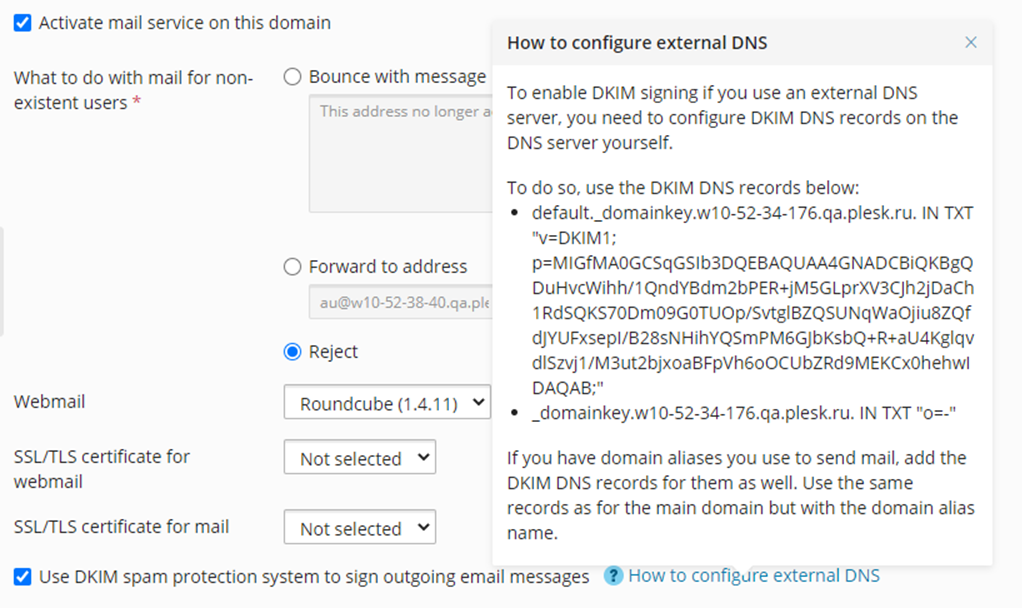
Starting from Plesk Obsidian 18.0.35 DKIM public key is shown in the pop-up window on the Mail Settings page of the particular domain.

  1. Log into Plesk

  2. Go to Domains > example.com > Mail Settings > How to configure external DNS:
mceclip0.png

  • For Plesk Version lower than 18.0.35 it's possible to use a manual approach:

For Linux

  1. Connect to the server via SSH

  2. Private keys are located in the corresponding domain directory in /etc/domainkeys/, for example, /etc/domainkeys/**example.com**/default (for selector "default")

  3. To extract a public key from a private, run the following:

    # openssl rsa -in /etc/domainkeys/example.com/default -pubout
    -----BEGIN PUBLIC KEY-----
    MIGfMA0GCSqGSIb3DQEBAQUAA4GNADCBiQKBgQC+aOU9Dw2Qedi6qOEcpbGQ3pHV
    I8SonKGNSBBgiImChx6k6I7s1UqeCzaHpKXKLIY4GA601gloVCnnTumZ/5TxnviB
    Hg1a2lsatt/gCj2pl61a+uALM1oRdgPhxPYefloFpi0lau8thV6u9BYTfUgfqIF+
    dvFIVlu0MULsWDDJfwIDAQAB
    -----END PUBLIC KEY-----

    Merge the result of the command above into one string, and add it as a TXT record for the domain on external DNS server:

    default._domainkey.example.com IN TXT "v=DKIM1;k=rsa; p=MIGfMA0GCSqGSIb3DQEBAQUAA4GNADCBiQKBgQC+aOU9Dw2Qedi6qOEcpbGQ3pHVI8SonKGNSBBgiImChx6k6I7s1UqeCzaHpKXKLIY4GA601gloVCnnTumZ/5TxnviBHg1a2lsatt/gCj2pl61a+uALM1oRdgPhxPYefloFpi0lau8thV6u9BYTfUgfqIF+dvFIVlu0MULsWDDJfwIDAQAB;"

For Windows

  1. Connect to the server via RDP

  2. In case of MailEnable mail server is used find it's configuration directory:

    reg query "HKEY_LOCAL_MACHINESOFTWAREWow6432NodeMail EnableMail Enable" | findstr "CONFIG"
    Configuration Directory REG_SZ C:Program Files (x86)Mail EnableCONFIG

    and execute below command, do not forget to replace -in path with found one plus add DKIMdefault-example.com.key:

    "%plesk_bin%openssl" rsa -in "C:Program Files (x86)Mail EnableConfigDKIMdefault-example.com.key" -pubout > C:public.key

    The file C:public.key will look like:

    -----BEGIN PUBLIC KEY-----
    MIGfMA0GCSqGSIb3DQEBAQUAA4GNADCBiQKBgQCj/lKsikGILTobyJySVXLe4vK2
    Yvt82Gqk0og/p5XOXhDxxpjUgKig437UucQHwwVrmwFZ0bavMlg3QLQvRb0S94fE
    5jRmikQ9I37v7BZtnxVXXbnrz/GDNLfWlHSugWcf0xY0xV5oi4mhhApwZOYq0SEM
    zLt5kgMkCY50hNPuNQIDAQAB
    -----END PUBLIC KEY-----

    Merge the result into one string and copy the data of the public key file into TXT record for the domain to add it on external DNS server.

    default._domainkey.example.com. TXT v=DKIM1; p=MIGfMA0GCSqGSIb3DQEBAQUAA4GNADCBiQKBgQCj/lKsikGILTobyJySVXLe4vK2Yvt82Gqk0og/p5XOXhDxxpjUgKig437UucQHwwVrm


Read the full article
Related Posts

How to Host a Go App on Plesk

Read More »

DNS_PROBE_FINISHED_NXDOMAIN: What Is It And How To Fix The Problem

Read More »

Exploring Plesk’s Added Value Solutions So Far in 2023

Read More »
Knowledge Base

Unable to issue a Let’s Encrypt certificate for a domain or its mail in Plesk: the DNS challenge used another IP address

Read More »

Websites on Plesk server are slow or show error 500 or PHP mail cannot be sent: ap_pass_brigade failed

Read More »

Mail delivery does not work: do not list domain in BOTH mydestination and virtual_mailbox_domains

Read More »

Mail stuck in the queue in the server with Plesk: Can’t connect to local MySQL server through socket ‘/var/lib/mysql/mysql.sock’ (13)

Read More »

Hosting Wiki

  • Django
  • Server Redundancy
  • QMAIL
  • Sendmail
  • Linux Containers
  • Google Cloud CDN
  • AMP
  • DKIM
  • Bare Metal Server
  • Oracle VM Server
  • Server Virtualization Software
  • Windows Server
  • Linux
  • MongoDB
  • Domain
  • Plesk
  • Web Server
  • Static DNS
  • DNS Server
  • DNS Forwarding
  • Reverse DNS
  • SSH
  • Email Autoresponder
  • Mailing Lists
  • Email Alias
  • Email Virus Protection
  • Email Forwarding
  • Webmail
X-twitter Linkedin Youtube Reddit Github
  • Product
  • Login
  • Pricing
  • Editions
  • For Partners
  • Partner Program
  • Contributor Program
  • Affiliate Program
  • Plesk University
  • Company
  • Blog
  • Careers
  • Events
  • About Plesk
  • Our Brand
  • Resources
  • User and Admin guides
  • Help Center
  • Migrate to Plesk
  • Contact Us
  • Hosting Wiki
  • Forum
  • Legal
  • Legal
  • Privacy Policy
  • Imprint

© 2025 WebPros International GmbH

Part of the WebPros®  Family