Symptoms
On a Plesk for Linux server, different operations like:
- renaming the subscription's system user in Domains > example.com > Hosting & DNS > Hosting;
- modifying settings of an additional FTP user in Domains > example.com > FTP;
- renaming a domain;
- restoring a Plesk backup;
- deleting a web user;
fail with the error like below which can be also found in the log file
/var/log/plesk/panel.logand/or in the "Network" tab of the browser's DevTools:external server error
SysUser::update() failed: Unable to execute usermng: usermng: /usr/sbin/usermod execution failed: usermod: user johndoe is currently used by process 4758 usermng: Unable to modify user: johndoe
Unable to execute usermng: usermng: /usr/sbin/userdel execution failed: userdel: user johndoe is currently used by process 4382 usermng: Unable to delete user: johndoe
usermod: user johndoe is currently used by process 2367804
usermng: Unable to modify user: johndoeThe PHP handler FPM application is set as a PHP handler in the menu Domains > example.com > PHP.
Cause
Product issue:
- #PPPM-10717 "Fixed the issue where renaming subscription system users and additional FTP users could sometimes fail with the âuser xxx is currently used by process xxxxxâ error."
Fixed in:- Plesk Obsidian 18.0.61 14 May 2024 (Linux)
Resolution
Workaround
Until the bug is fixed, use the workaround:
Perform one of the following actions in each domain of the affected subscription:
Change the PHP handler to FastCGI application: go to Domains > example.com > PHP and in the option run PHP as, change the handler from FPM application to FastCGI application, and click OK or Apply at the bottom of the page.
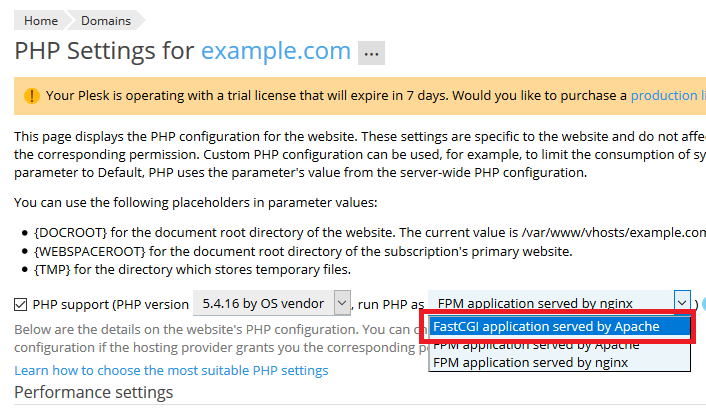
Disable PHP: go to Domains > example.com > PHP, disable the option PHP support, and click OK or Apply at the bottom of the page.
Suspend the affected subscription.
Connect to the server using SSH.
If Cgroups Manager is installed and enabled, disable it:
# plesk sbin resctrl --disable
Execute the following command, replacing
$usernamewith the name of the subscription's system user:# killall -TERM -u $username; sleep 1; killall -KILL -u $username
Note: to find the subscripton's system user name, check the field Username under System user's credentials in the menu Domains > example.com > Hosting & DNS > Hosting.
In the Plesk interface, perform the operation that was failing.
Revert changes made in steps 2, 3, and 5.
Note: for reverting step 5, execute the command
plesk sbin resctrl --enable.
