Adding tabs to a page in Plesk UI is a very popular task. Tabs are
commonly used when there is a complex object or part of functionality
(for example, mail service on subscription) and several pages with
operations over it (for example, mail addresses management, mail
settings per domain, outgoing mail protection). So, when the user is on
the page of this object/functionality, they can see all available
operations, and are able to start working with the most often used
without the navigation. And have access to less often used just in one
click.
To add a tab to a page, you need to define it in the controller (or even
in init() of the controller, so they are available for all actions):
class IndexController extends pm_Controller_Action
{
    public function init()
    {
        parent::init();
        $this->view->tabs = [
            [
                'title' => 'Form',
                'action' => 'form',
            ],
            [
                'title' => 'Tools',
                'action' => 'tools',
            ],
            [
                'title' => 'List',
                'action' => 'list',
            ],
        ];
    }
    public function formAction()
    {
        // form action definition
    }
    public function toolsAction()
    {
        // tools action definition
    }
    public function listAction()
    {
        // list action definition
    }
}
Then render it in each view (.phtml) using the
pm_View_Helper_RenderTabs
helper:
<?php echo $this->renderTabs($this->tabs); ?>
Now you can visit the controller of your extension and check the result:
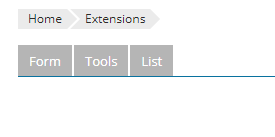
Moreover, you can see what the tabbed page would look like on a Plesk
server using a different color scheme or branding (for example, when the
Skins and Color Schemes
extension
is installed), or what the form would look like in adaptive design on a
mobile device.
For more examples of how to use tabs, refer to the sample extension
found here.
