Symptoms
Unable to delete an IP address from Plesk > Tools & Settings > IP Address:
Error: IP address cannot be removed because it is used by DNS zone of one or more domains
The following commands show that the address is occupied by a DNS record of a domain hosted in Plesk:
# plesk db
<..>
mysql> select * from dns_recs where val='203.0.113.2' or displayVal='203.0.113.2';
Cause
Database inconsistency - incorrect IP address is assigned to a DNS record.
Resolution
Go to Domains > example.com and check the actual IP assigned to the domain:
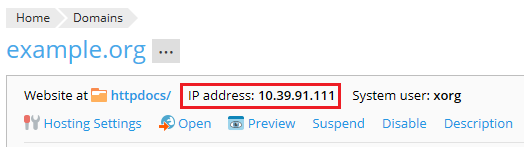
Go to Domains > example.com > DNS Settings and assign the actual IP address to all records:
For one record
- Click on the required record.
- Alter the IP address field.
- Submit the changes by pressing OK.
- Confirm the changes again with the Update button on the DNS Settings screen.
For all the records at once
Click on the Apply DNS Template button.
For all the incorrect records via CLI
Connect to the server via SSH.
Update incorrect records with the correct IP address:
# UPDATE dns_recs SET displayVal = '10.39.91.111' WHERE displayVal = '203.0.113.2';
UPDATE dns_recs SET val = '10.39.91.111' WHERE val = '203.0.113.2';
