Symptoms
Domain with WHMCS shows error:
The PHP session save path /var/lib/php/session is not writable. Please investigate the session.save_path PHP setting or contact your system administrator.
Warning: session_start(): open(C:WindowsTempsess_udfqa0si9tsg9i89dhene7ms78, O_RDWR) failed: Permission denied (13) in C:inetpubvhostsexample.comincludesconnect.php on line 2
Permissions for the folder mentioned in the error are correct:
# ls -la /var/lib/php/
...
drwx-wx-wt 2 root root 4096 Nov 15 23:36 sessionC:> UsersAdministrator>icacls C:WindowsTemp
C:WindowsTemp NT AUTHORITYNETWORK SERVICE:(CI)(RX,D,WD,AD)
HOSTNAMEPP_WPG:(CI)(RX)
HOSTNAMEpsaserv:(CI)(RX)
HOSTNAMEpsacln:(CI)(RX)
HOSTNAMEpsaadm:(CI)(RX)
HOSTNAMEpsaadm:(OI)(IO)(R)
BUILTINUsers:(CI)(S,WD,AD,X)
BUILTINIIS_IUSRS:(OI)(CI)(S,RD)
CREATOR OWNER:(OI)(CI)(IO)(F)
NT AUTHORITYSYSTEM:(OI)(CI)(F)
BUILTINAdministrators:(OI)(CI)(F)
Cause
Subscription system user directory for sessions is not created or it is not set in the session.save_path PHP settings.
Resolution
Note: in case there is no WHMCS installed on the same server, refer to the following article: Website hosted in Plesk displayed incorrectly or showing the PHP warning: Failed to read session data: files
It is required to create a special directory for the PHP sessions. It is possible to do it via SSH (for Linux) or via Plesk UI (for both Linux and Windows).
Using Plesk Interface
Open File Manager under Domains > example.com.
Click New and choose Create directory.
Specify some name for the folder in this case we call it phpsessions.
Go to the PHP-Settings under Domains > example.com.
Change the setting session.save_path to the total path of a created folder:
/var/www/vhosts/example.com/phpsessions
C:inetpubvhostsexample.comhttpdocsphpsessions
Using SSH
Connect to the server using SSH;
Execute the following commands, instead of example, insert subscription system user name:
# mkdir -p /home/example/whmcsdata/sessions
# chmod 1750 /h /home/example/whmcsdata/sessions
# chown example:psacln /home/example/whmcsdata/sessionsLog into Plesk;
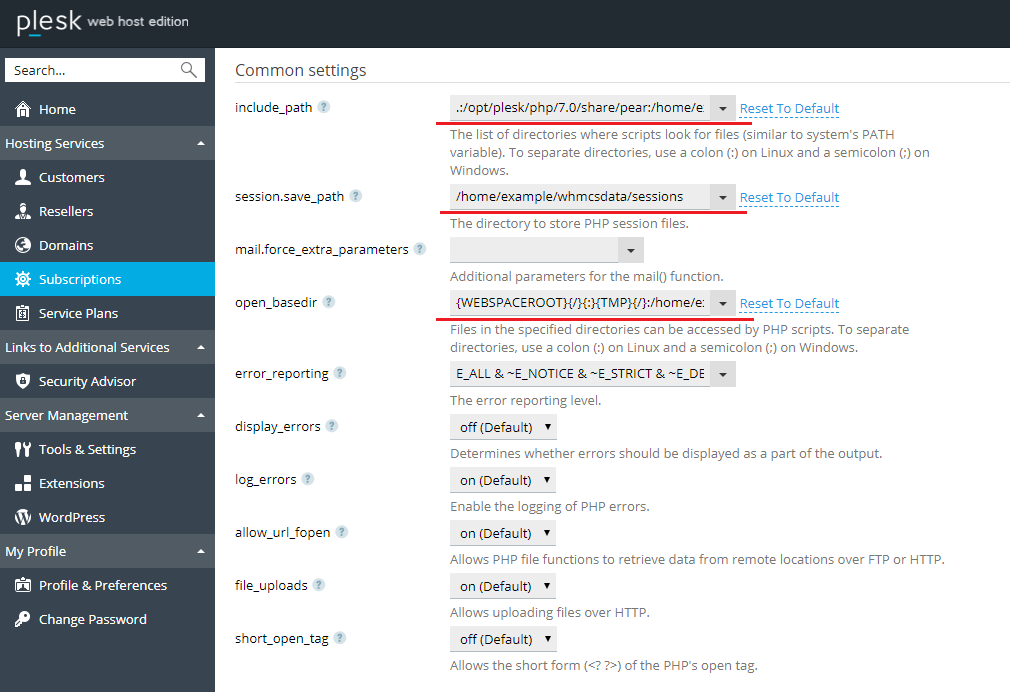
Navigate to Domains > example.com > PHP settings;
Set the following directives, for example (for PHP 7.0) and click OK to apply the change:
include_path: ":/opt/plesk/php/7.0/share/pear:/home/example/whmcsdata/sessions"
session.save_path: ":/home/example/whmcsdata/sessions"
open_basedir: ":{WEBSPACEROOT}{/}{:}{TMP}{/}:/home/example/whmcsdata/sessions"