Symptoms
The following error is shown for a WordPress instance in WP Toolkit :
{"err_code":40002,"err_message":"Unable to locate configuration path"} PHP Notice: Undefined variable: exit in /usr/share/plesk-wp-cli/php/class-wp-cli.php on line 503 PHP Notice: Undefined variable: exit in /usr/share/plesk-wp-cli/php/class-wp-cli.php on line 505
The similar error is shown when enabling Switch to HTTPS in Plesk at Advisor > Recommendation > Secure WordPress Sites for the affected WordPress instances:
Cannot switch from HTTP to HTTPS: Execution extension has failed with exit code 3, stdout: , stderr: ERR [util_exec] proc_close() failed ['/usr/local/psa/admin/bin/filemng' 'example' 'exec' '/var/www/vhosts/example.com' '/usr/local/psa/admin/plib/modules/wp-toolkit/vendor/wp-cli/wp-cli/bin/wp' '--path=/var/www/vhosts/example.com/httpdocs' 'search-replace' '' '' '--skip-columns=guid'] with exit code [66] Unable to locate configuration path {"err_code":40002,"err_message":"Unable to locate configuration path"}
The following entry can be found in
/var/log/plesk/panel.log:An error occurred while executing WP-CLI command for instance: WordPress instance #134 ('/httpdocs')
Cause
WordPress instance is corrupted and has missing directories/files.
Resolution
WP Toolkit finds all actual/removed WordPress installations by wp-* mask inside of domain's webspace directory.
Browse to Domains > example.com > File Manager and check the content of the WordPress installation directory.
If it is empty or accidentally completely removed, restore the website from the backup.
If the installation was removed previously directly from the file system on purpose and orphaned file/directories are remained, like
wp-contentfolder, detach the instance and perform a new scan:- Browse to WordPress extension and Detach it:

- Scan for installed WordPress instances:
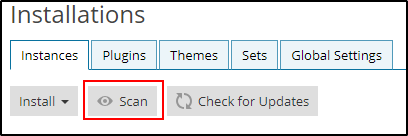
- Browse to WordPress extension and Detach it:
