Question
How to reconfigure the PleskControlPanel website in IIS > Sites?
Answer
The website PleskControlPanel in IIS is used to serve the Plesk user interface.
To reconfigure PleskControlPanel website apply the following steps:
Recreating PleskControlPanel on Plesk Obsidian
Connect to the server via RDP.
Open Command Prompt as administrator.
Execute the following commands:
C:> plesk bin repair --configure-plesk-website
Recreating PleskControlPanel on Plesk Onyx
Connect to the server via RDP.
Open Command Prompt as administrator.
Execute the following commands:
C:> "%plesk_bin64%"websrvmng.exe --configure-anonymous-access
C:> "%plesk_bin64%"websrvmng.exe --remove-sites-cache
C:> "%plesk_bin64%"websrvmng.exe --configure-plesk-website
Reconfiguring PleskControlPanel on Plesk 12.5 and older
Connect to the server via RDP.
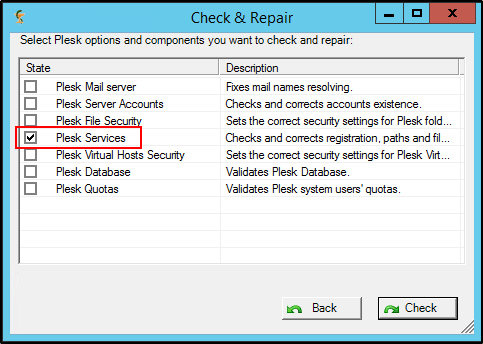
Delete the
PleskControlPanelwebsite from IIS > Sites.Launch Plesk Reconfigurator > Repair Plesk installation > Plesk Services as administrator.