Skip to content
  • Solutions
    By Role
    • For Developers
    • For Content Managers
    • For Agencies
    • For IT Admins
    • For Web Hosters
    • For Developers
    • For Content Managers
    • For Agencies
    • For IT Admins
    • For Web Hosters
    By Infrastructure
    • Overview
    • SolusVM
    • AWS
    • Microsoft Azure
    • Alibaba Cloud
    • Google Cloud Platform
    • Vultr
    • Overview
    • SolusVM
    • AWS
    • Microsoft Azure
    • Alibaba Cloud
    • Google Cloud Platform
    • Vultr
    • Digital Ocean
    • Linode
    • Upcloud
    • Oracle
    • OVH
    • Digital Ocean
    • Linode
    • Upcloud
    • Oracle
    • OVH
  • Product
    • Plesk Features
    • Plesk Editions
    • What’s new
    • Pricing
    • Roadmap
    • Lifecycle Policy
    • Extensions Catalogue
  • Pricing
  • Extensions
    Featured Extensions
    • SocialBee
    • WP Toolkit
    • WP Guardian
    • Sitejet Builder for Plesk
    • SEO Toolkit
    • Premium Email
    • Email Security
    • SocialBee
    • WP Toolkit
    • WP Guardian
    • Sitejet Builder for Plesk
    • SEO Toolkit
    • Premium Email
    • Email Security
    Bundles and packs:
    • Business and Collaboration Edition
    • WP pack
    • Hosting pack
    • Power pack
    • Language pack
    • Business and Collaboration Edition
    • WP pack
    • Hosting pack
    • Power pack
    • Language pack

    See all Extensions

  • For Partners
    • Plesk Contributor Program
    • Plesk Partner Program
    • Plesk Developer Program
    • Affiliate program
    • Plesk University
  • Help Center
    • Documentation
    • Professional Services
    • Support
    • Contact Us
    • Wiki
    • Forum
  • Plesk 360 login
  • Free Trial
  • Pricing
  • Solutions
    • By Role
      • For Developers
      • For Content Managers
      • For Agencies
      • For IT Admins
      • For Web Hosters
    • By Infrastructure
      • Overview
      • Plesk on Amazon Web Services (AWS & Lightsail)
      • Microsoft Azure
      • Alibaba Cloud
      • Google Cloud Platform
      • Vultr
      • DigitalOcean
      • Linode
      • UpCloud
      • Oracle
      • OVH
  • Products
  • Pricing
  • Extensions
    • Featured Extensions
      • SocialBee
      • WP Toolkit
      • Sitejet Builder for Plesk
      • SEO Toolkit
      • WP Guardian
      • Premium Email
      • Email Security
    • Bundles and packs:
      • Business and Collaboration Edition
      • WP pack
      • Hosting pack
      • Power pack
      • Language pack
      • See all Extensions
  • For Partners
    • Plesk Contributor Program
    • Plesk Partner Program
    • Plesk Developer Program
    • Affiliate Program
    • Plesk University
  • Help Center
    • Documentation
    • Professional Services
    • Support
    • Contact Us
    • Wiki
    • Forum
  • Plesk 360 login
  • Free Trial
  • Pricing
  • Solutions
    • By Role
      • For Developers
      • For Content Managers
      • For Agencies
      • For IT Admins
      • For Web Hosters
    • By Infrastructure
      • Overview
      • Plesk on Amazon Web Services (AWS & Lightsail)
      • Microsoft Azure
      • Alibaba Cloud
      • Google Cloud Platform
      • Vultr
      • DigitalOcean
      • Linode
      • UpCloud
      • Oracle
      • OVH
  • Products
  • Pricing
  • Extensions
    • Featured Extensions
      • SocialBee
      • WP Toolkit
      • Sitejet Builder for Plesk
      • SEO Toolkit
      • WP Guardian
      • Premium Email
      • Email Security
    • Bundles and packs:
      • Business and Collaboration Edition
      • WP pack
      • Hosting pack
      • Power pack
      • Language pack
      • See all Extensions
  • For Partners
    • Plesk Contributor Program
    • Plesk Partner Program
    • Plesk Developer Program
    • Affiliate Program
    • Plesk University
  • Help Center
    • Documentation
    • Professional Services
    • Support
    • Contact Us
    • Wiki
    • Forum
  • Plesk 360 login
  • Free Trial
Plesk 360 login
Free Trial

Knowledge Base

Adding and Removing Plesk Components

 
administrator guideplesk administrationplesk componentsserversoftware

To add or remove Plesk components, go to Tools & Settings >
Updates.

When you select Add/Remove Components, you will be asked to provide
system user credentials to proceed.

Note: You need to provide system user credentials, not those used to log in
to Plesk. The user in question also must have the necessary
permissions to install software. The administrator credentials you
use to log in to the server via RDP should work fine here.
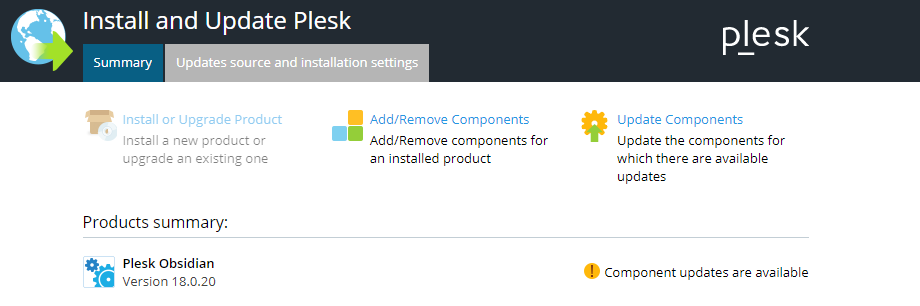
image 74721

Next, click Add/Remove Components to see a list of all available
Plesk components. Some of them are presented individually, and some are
grouped by function.
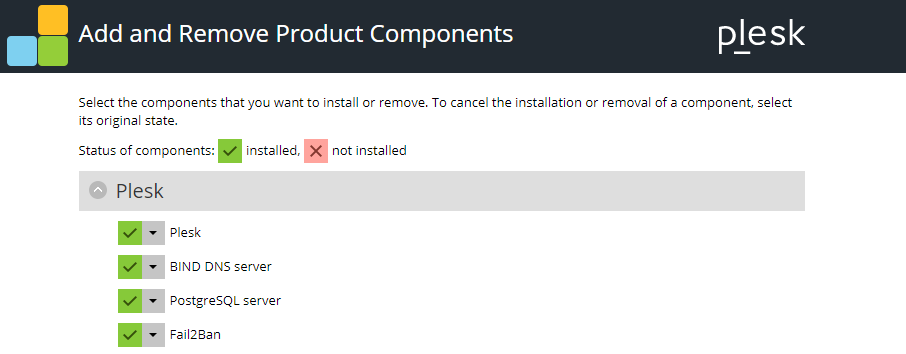
image 74722

The image 74723 icon next to a component indicates that the
component is installed, and the image 74724 icon indicates that it
is not installed. The image 74725 icon next to a group of
components indicates that not all components in the group are installed.
Groups with all components installed are marked with the
image 74726 icon, and those with no components installed are
marked with the image 74727 icon.

image 74732

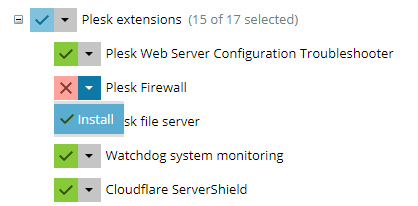
To mark a component for installation, click the image 74728 icon
next to the component’s name > Install. You can mark all components
in a group for installation by clicking the image 74729 icon next
to the component’s name > Install.
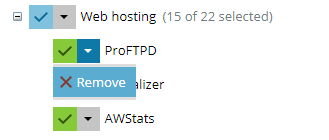
image 74733

To mark a component for removal, click the image 74730 icon next
to the component’s name > Remove. You can mark all components in a
group for removal by clicking the image 74731 icon next to the
component’s name > Remove.

After you have marked all components you want to install or remove,
click Continue to begin the installation or removal. To exit the
Plesk Installer without making any changes, click Cancel modifying.

Read the full article
Related Posts

Exploring Plesk’s Added Value Solutions So Far in 2023

Read More »

Unveiling Sitejet Builder: The Perfect Match for Your Effortless Website Creation Needs

Read More »

Dynamic List vs. Active List: A Comprehensive Comparison – Unveiling the Ultimate Winner!

Read More »
Knowledge Base

Antivirus Software

Read More »

Removing Backup Files from Server

Read More »

Optimizing Apache Web Server – Setting Up the Apache Restart Interval

Read More »

Plesk Updates – Plesk Versioning

Read More »

Hosting Wiki

  • Server Redundancy
  • Bare Metal Server
  • Oracle VM Server
  • Server Virtualization Software
  • Windows Server
  • Plesk
  • Web Server
  • DNS Server
X-twitter Linkedin Youtube Reddit Github
  • Product
  • Login
  • Pricing
  • Editions
  • For Partners
  • Partner Program
  • Contributor Program
  • Affiliate Program
  • Plesk University
  • Company
  • Blog
  • Careers
  • Events
  • About Plesk
  • Our Brand
  • Resources
  • User and Admin guides
  • Help Center
  • Migrate to Plesk
  • Contact Us
  • Hosting Wiki
  • Forum
  • Legal
  • Legal
  • Privacy Policy
  • Imprint

© 2026 WebPros International GmbH

Part of the WebPros®  Family