Skip to content
  • Solutions
    By Role
    • For Developers
    • For Content Managers
    • For Agencies
    • For IT Admins
    • For Web Hosters
    • For Developers
    • For Content Managers
    • For Agencies
    • For IT Admins
    • For Web Hosters
    By Infrastructure
    • Overview
    • SolusVM
    • AWS
    • Microsoft Azure
    • Alibaba Cloud
    • Google Cloud Platform
    • Vultr
    • Overview
    • SolusVM
    • AWS
    • Microsoft Azure
    • Alibaba Cloud
    • Google Cloud Platform
    • Vultr
    • Digital Ocean
    • Linode
    • Upcloud
    • Oracle
    • OVH
    • Digital Ocean
    • Linode
    • Upcloud
    • Oracle
    • OVH
  • Product
    • Plesk Features
    • Plesk Editions
    • What’s new
    • Pricing
    • Roadmap
    • Lifecycle Policy
    • Extensions Catalogue
  • Pricing
  • Extensions
    Featured Extensions
    • SocialBee
    • WP Toolkit
    • WP Guardian
    • Sitejet Builder for Plesk
    • SEO Toolkit
    • Premium Email
    • Email Security
    • SocialBee
    • WP Toolkit
    • WP Guardian
    • Sitejet Builder for Plesk
    • SEO Toolkit
    • Premium Email
    • Email Security
    Bundles and packs:
    • Business and Collaboration Edition
    • WP pack
    • Hosting pack
    • Power pack
    • Language pack
    • Business and Collaboration Edition
    • WP pack
    • Hosting pack
    • Power pack
    • Language pack

    See all Extensions

  • For Partners
    • Plesk Contributor Program
    • Plesk Partner Program
    • Plesk Developer Program
    • Affiliate program
    • Plesk University
  • Help Center
    • Documentation
    • Professional Services
    • Support
    • Contact Us
    • Wiki
    • Forum
  • Plesk 360 login
  • Free Trial
  • Pricing
  • Solutions
    • By Role
      • For Developers
      • For Content Managers
      • For Agencies
      • For IT Admins
      • For Web Hosters
    • By Infrastructure
      • Overview
      • Plesk on Amazon Web Services (AWS & Lightsail)
      • Microsoft Azure
      • Alibaba Cloud
      • Google Cloud Platform
      • Vultr
      • DigitalOcean
      • Linode
      • UpCloud
      • Oracle
      • OVH
  • Products
  • Pricing
  • Extensions
    • Featured Extensions
      • SocialBee
      • WP Toolkit
      • Sitejet Builder for Plesk
      • SEO Toolkit
      • WP Guardian
      • Premium Email
      • Email Security
    • Bundles and packs:
      • Business and Collaboration Edition
      • WP pack
      • Hosting pack
      • Power pack
      • Language pack
      • See all Extensions
  • For Partners
    • Plesk Contributor Program
    • Plesk Partner Program
    • Plesk Developer Program
    • Affiliate Program
    • Plesk University
  • Help Center
    • Documentation
    • Professional Services
    • Support
    • Contact Us
    • Wiki
    • Forum
  • Plesk 360 login
  • Free Trial
  • Pricing
  • Solutions
    • By Role
      • For Developers
      • For Content Managers
      • For Agencies
      • For IT Admins
      • For Web Hosters
    • By Infrastructure
      • Overview
      • Plesk on Amazon Web Services (AWS & Lightsail)
      • Microsoft Azure
      • Alibaba Cloud
      • Google Cloud Platform
      • Vultr
      • DigitalOcean
      • Linode
      • UpCloud
      • Oracle
      • OVH
  • Products
  • Pricing
  • Extensions
    • Featured Extensions
      • SocialBee
      • WP Toolkit
      • Sitejet Builder for Plesk
      • SEO Toolkit
      • WP Guardian
      • Premium Email
      • Email Security
    • Bundles and packs:
      • Business and Collaboration Edition
      • WP pack
      • Hosting pack
      • Power pack
      • Language pack
      • See all Extensions
  • For Partners
    • Plesk Contributor Program
    • Plesk Partner Program
    • Plesk Developer Program
    • Affiliate Program
    • Plesk University
  • Help Center
    • Documentation
    • Professional Services
    • Support
    • Contact Us
    • Wiki
    • Forum
  • Plesk 360 login
  • Free Trial
Plesk 360 login
Free Trial

Knowledge Base

Website is not accessible: Increasing max input vars limit needed

 
domainsphpphp settingsplesk for linuxplesk for windows

Symptoms

The website is not accessible. The following error is shown in the browser screen:

PHP Max Input Vars: [?] 1000 - Recommended Value: 3000. Max input vars limitation truncate POST data such as menus. Increasing max input vars limit needed.

Cause

Default value for max_input_vars directive is insufficient.

Resolution

  1. Log into Plesk.

  2. Increasemax_input_vars parameter in Domains > example.com > PHP Settings > Additional configuration directives:
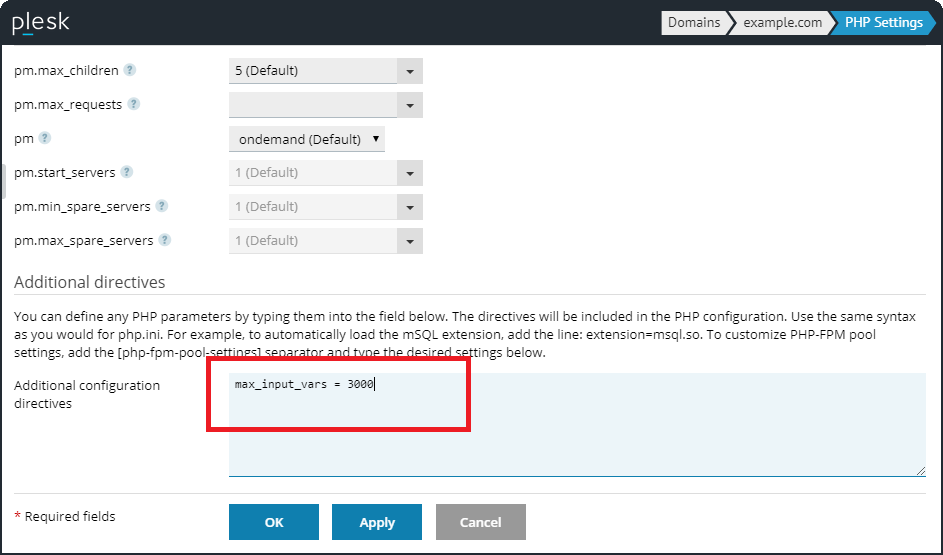
    border_plus_Screenshot_6__1_.png

    NOTE: If there is no Additional configuration directives in PHP settings, contact your system administrator. 
Read the full article
Related Posts

Keep Legacy PHP Secure with Extended Lifecycle Support in Plesk

Read More »

Ruby on Rails vs PHP: Which one’s right for your needs?

Read More »

Exploring Plesk’s Added Value Solutions So Far in 2023

Read More »
Knowledge Base

Website configured on Plesk server shows Error 504: Maximum execution time of 30 seconds exceeded

Read More »

Domain on Plesk with WHMCS shows error: The PHP session save path /var/lib/php/session is not writable

Read More »

Which PHP version and PHP handler should be chosen for the domain in Plesk

Read More »

Website hosted on Plesk server does not work after switching to PHP 7.x: Call to undefined function mysql_connect()

Read More »

Hosting Wiki

  • PhpMyAdmin
  • phpPgAdmin
  • Linux
  • PHP
  • Domain
  • Plesk
X-twitter Linkedin Youtube Reddit Github
  • Product
  • Login
  • Pricing
  • Editions
  • For Partners
  • Partner Program
  • Contributor Program
  • Affiliate Program
  • Plesk University
  • Company
  • Blog
  • Careers
  • Events
  • About Plesk
  • Our Brand
  • Resources
  • User and Admin guides
  • Help Center
  • Migrate to Plesk
  • Contact Us
  • Hosting Wiki
  • Forum
  • Legal
  • Legal
  • Privacy Policy
  • Imprint

© 2026 WebPros International GmbH

Part of the WebPros®  Family