Symptoms
Issuing a wildcard Let's Encrypt certificate in Plesk in Domains > example.com > SSL/TLS Certificates > Install fails:
Error: Could not issue a Let's Encrypt SSL/TLS certificate for example.com. Authorization for the domain failed.
Details
Invalid response from https://acme-v02.api.letsencrypt.org/acme/authz/zEHPSbB4eUyIomzu9qynFouNGrIgiUlJZ755z_Kx4kY.
Details:
Type: urn:ietf:params:acme:error:dns
Status: 400
Detail: DNS problem: NXDOMAIN looking up TXT for _acme-challenge.example.com
Cause
The TXT DNS record for the hostname _acme-challenge.example.com is not available globally:
# nslookup -type=TXT _acme-challenge.example.com
Server: 8.8.8.8
Address: 8.8.8.8#53
** server can't find _acme-challenge.example.com: NXDOMAIN
Resolution
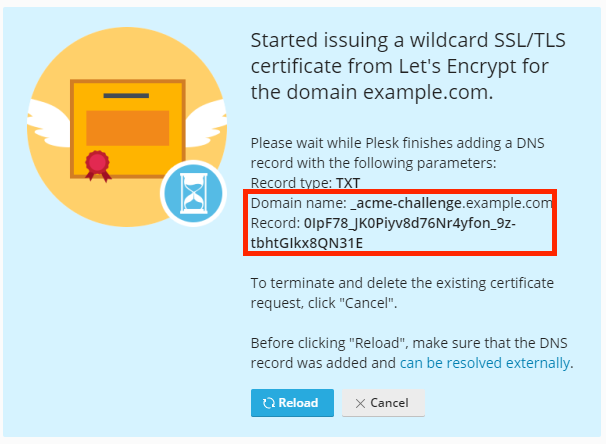
Start issuing a new wildcard Let's Encrypt certificate in Domains > example.com > SSL/TLS Certificates > Install - the following notification screen will appear:
Proceed in accordance with where the domain's DNS zone is hosted:
DNS zone of the domain is hosted on the Plesk server
Wait until the DNS propagation is completed and the required TXT record for the hostname _acme-challenge.example.com is available globally. The availability of this record can be checked on resources like https://dnschecker.org/.
Press the Reload button in the notification screen from step 2.
DNS zone of the domain is hosted on external DNS hosting
On the external DNS hosting, add the TXT record for the hostname _acme-challenge.example.com (or just for _acme-challenge on some DNS providers) using the value from the notification screen from step 2.
Wait until the DNS propagation is completed and the required TXT record for the hostname _acme-challenge.example.com is available globally. The availability of this record can be checked on resources like https://dnschecker.org/.
Press the Reload button in the notification screen from step 2.
