A long time ago in a galaxy far, far away… just kidding. The premiere of the new Star Wars movie is still over a week away. However, something else exciting happened on December 3rd – the release of the public beta of the Let’s Encrypt service.
Why should you care? In a nutshell, this service gives you the ability to install a free, trusted certificate on any of your websites. This not only encrypts the connection between the website and the visitor’s browser, but also displays your website as trusted. Meaning, the visitor will not see a warning about the certificate’s authenticity.
This advantage over self-signed certificates (which are free, but not trusted) is especially relevant when securing an E-commerce website. In addition to issuing free SSL certificates, Let’s Encrypt also provides the tools for recalling and renewing them. This, in theory, should save system administrators a lot of time and effort.
You can read more about the project by visiting its homepage, found at Let’s Encrypt.
Why use Let’s Encrypt?
Granted, you could buy a TLS certificate before. But it made little financial sense for small websites with low readership, like personal websites. Another company (StartCom) has also been offering free certificates for some time. However, they come with a number of limitations – no commercial usage, paid certificate revoking, and so on. In addition, you can only request a free certificate from StartCom manually. Meanwhile, you can get free Let’s Encrypt SSL certificates issued automatically, saving time and effort.
The Let’s Encrypt project comes with a number of caveats, namely:
- The issued free ssl certificates remain valid for 90 days, and has to be renewed on a regular basis. Naturally, if you decide to update manually, you’re bound to forget to do it sooner or later.
- The official Let’s Encrypt client features only a CLI interface.
- The client works by editing the Apache configuration files, which introduces the chance of something going wrong (with potentially unpleasant results).
- Nginx support is still in the experimental stage.
- Client installation requires the presence of development tools (autotool, gcc) on the server to compile dependencies (cryptography, psutil, python-pip, python-virtualenv, virtualenv, cffi), which is not generally recommended on a production server.
Let’s Encrypt on Plesk
If you manage your server via Plesk, none of this concerns you. We compiled a number of Let’s Encrypt packages for most of the OSes supported by Plesk. They’re now in a separate repository on http://autoinstall.plesk.com/. In addition, we prepared a Let’s Encrypt extension for Plesk, consisting of two parts:
- Backend – the official Let’s Encrypt CLI client together with a plugin facilitating its integration with Plesk. The plugin uses the Plesk XML API to validate and install certificates.
- The extension itself, providing the user interface and automatically renewing the certificates.
Try Let’s Encrypt in action
- Log in to Plesk and install the Let’s Encrypt extension via the Extension Catalog:
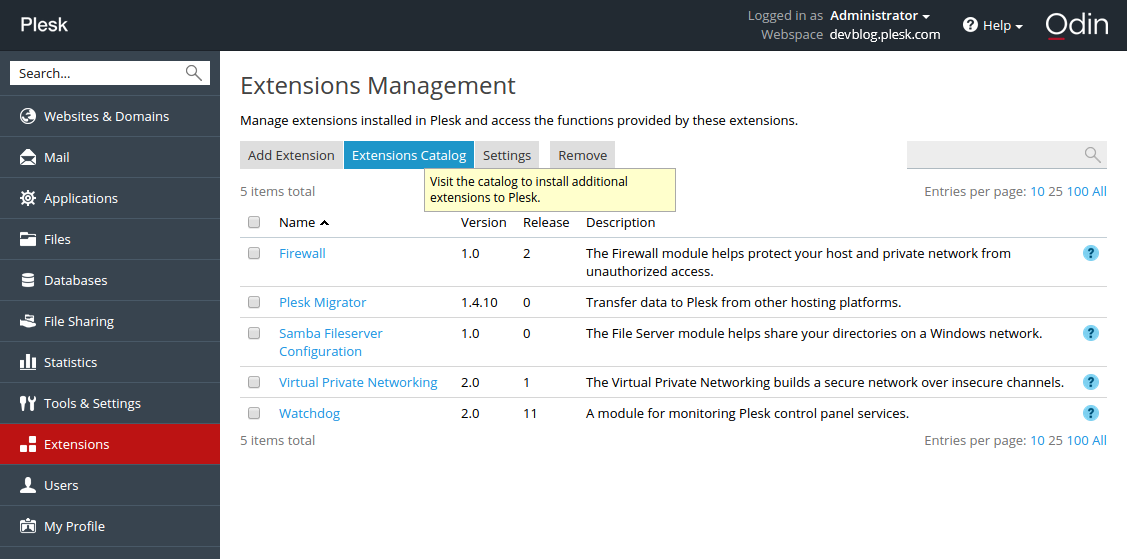
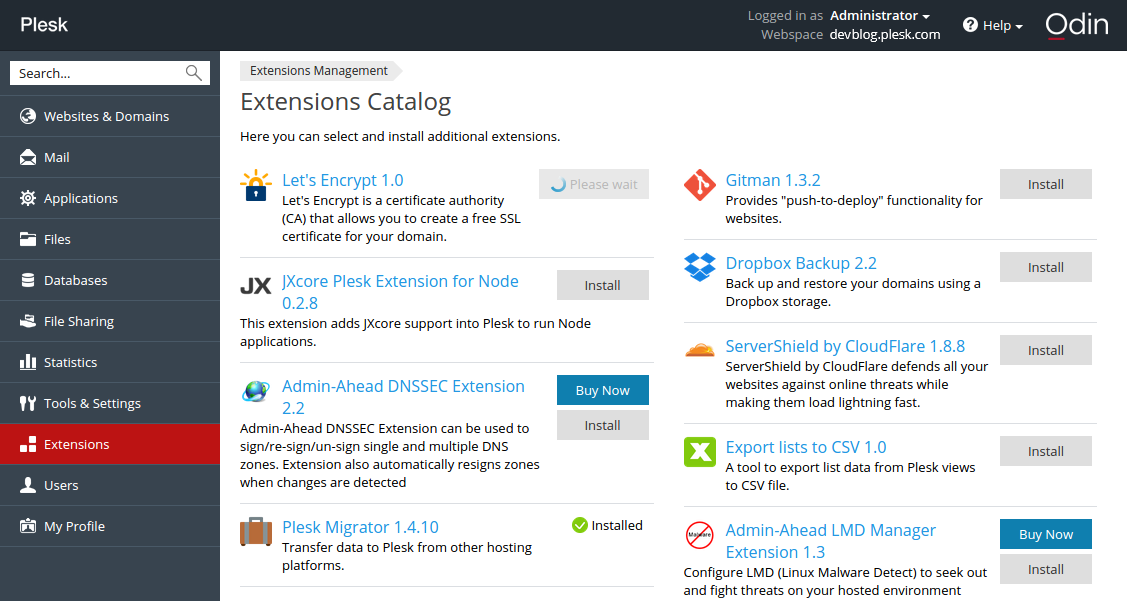
2. After the installation, run a shell script. It fetches dependencies (sets up repositories and installs missing packages). Then it creates a virtualenv virtual environment and installs the Let’s Encrypt console client with the Plesk plugin inside.
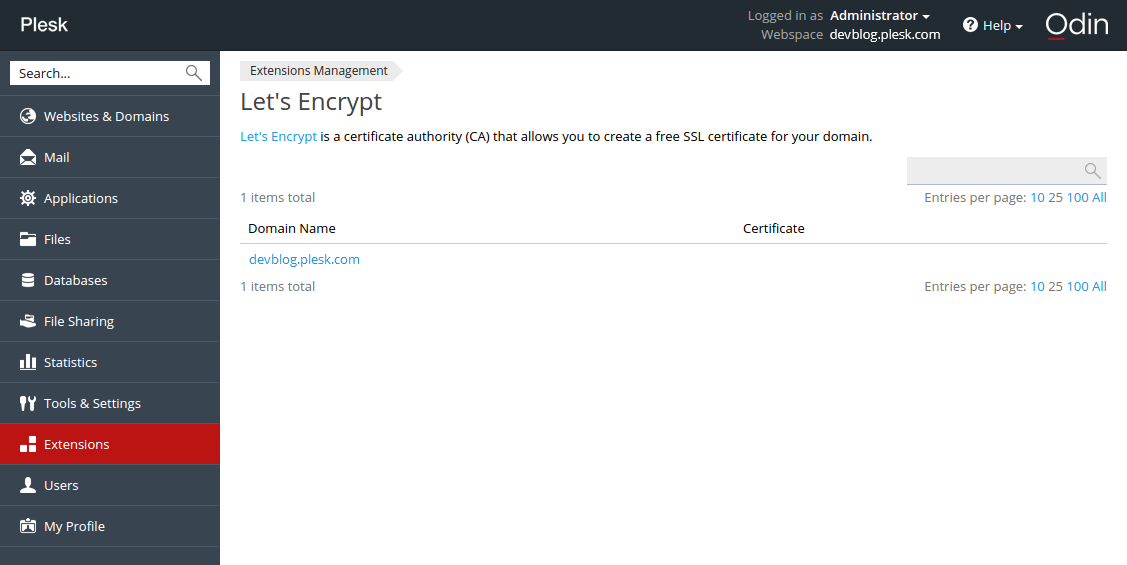
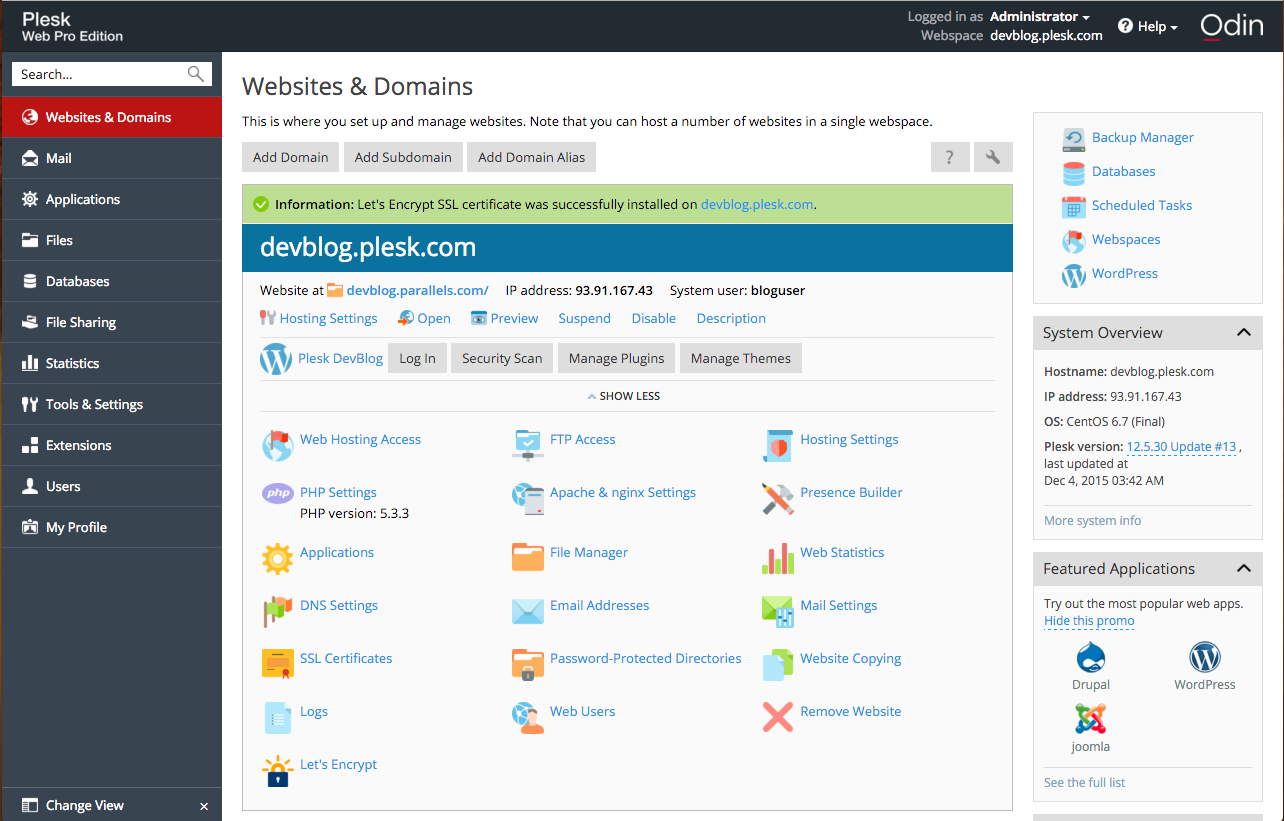
3. Next, click the installed extension, select a website and install the certificate.
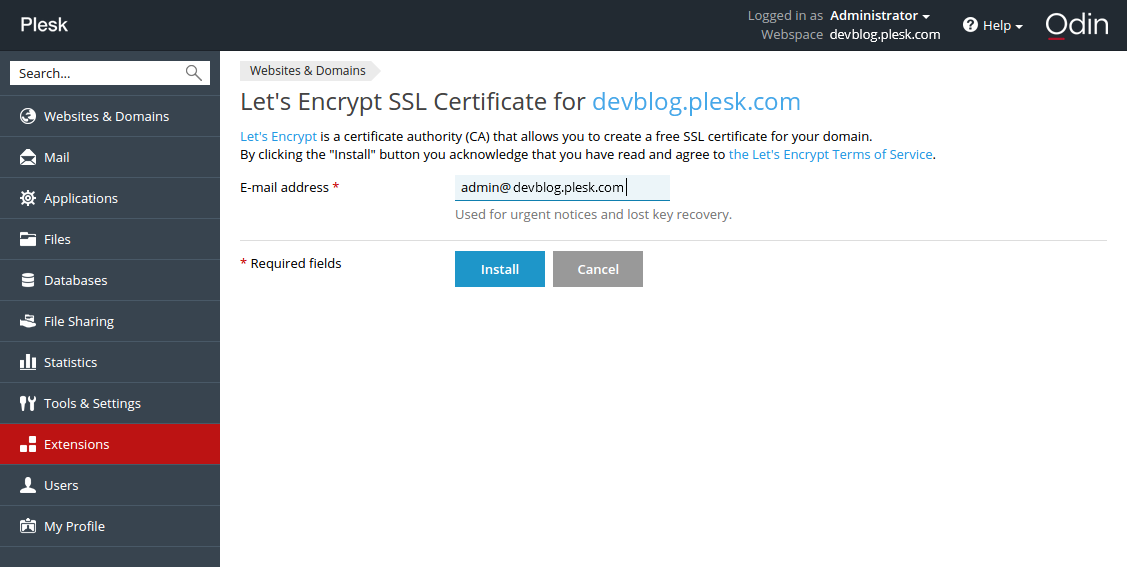
If you have already used the CLI client, you will recognize the interactive mode dialog in this web form. On a “success” message, follow the link…
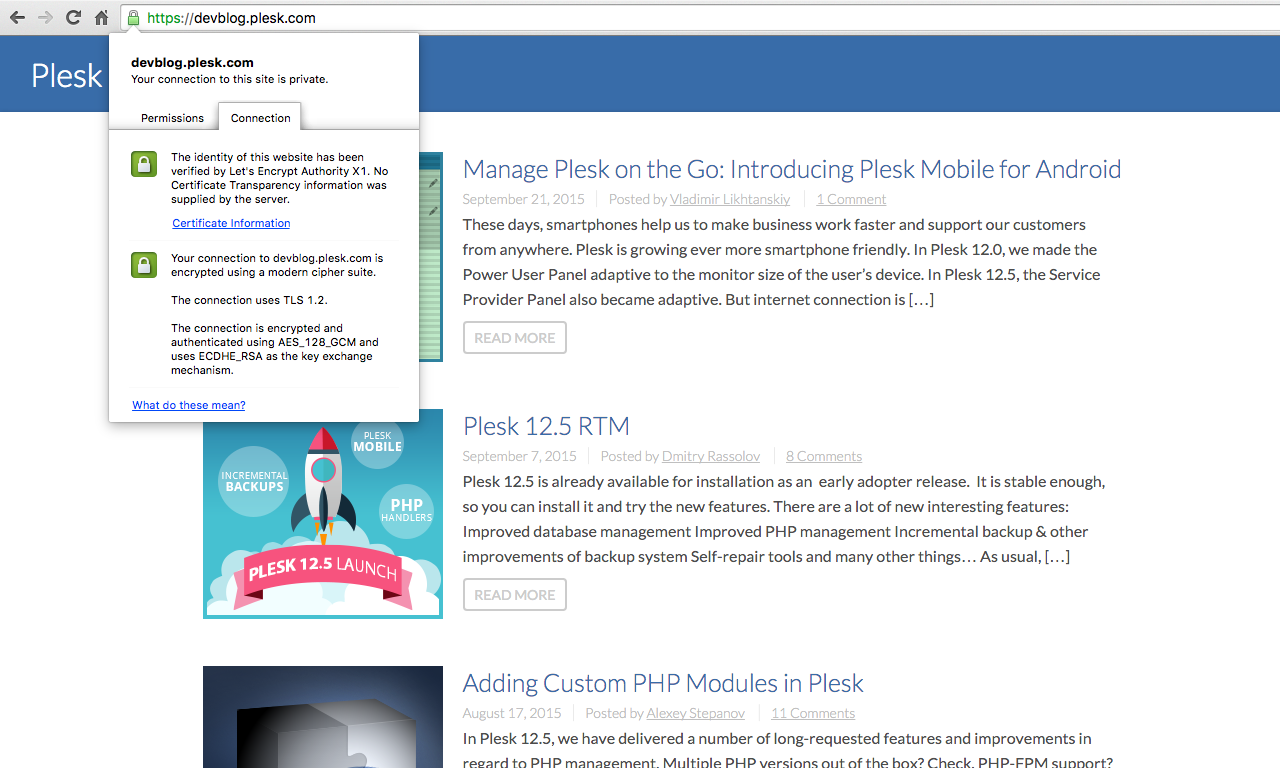
… to open the website and see the green “https” icon in the address bar.
4. Check that the certificate renewal task has been added to Tools & Settings > Scheduled tasks:
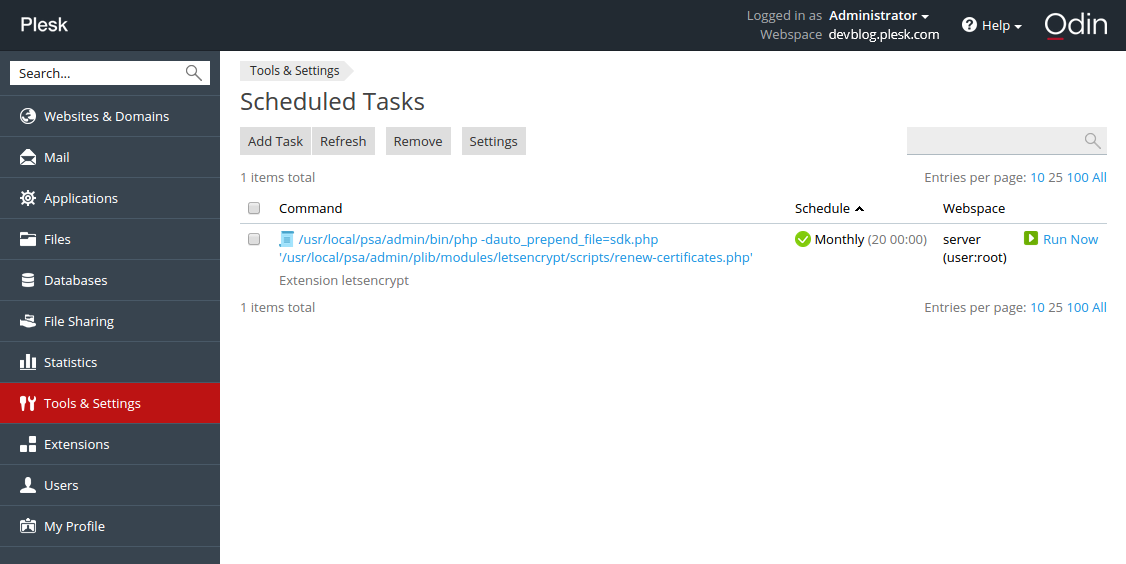
Issued certificates are valid for 90 days, but according to the recommendation of the Let’s Encrypt developers, they are renewed on a monthly basis.
So what do you think?
And there you have it! A free certificate for your website, obtained from the Plesk interface, in just a few clicks. It already works on this site, on this page – look at your browser’s address bar!
Give the Let’s Encrypt on Plesk extension a whirl. And let us know what you think in the comments!


119 Comments
Hi
The extension works great even on subdomains. But i would like to suggest a few improvements:
+Ability to secure the webmail.domain.tld created by plesk
+Abilty to secure the Plesk Interface itself
+Ability to secure the mail server communicatio. For smtp imap and pop communication of external clients.
+Ftps security
The approach to secure the web eith free trusted certificates is great….but even better if all communication is secured.
excuse me i dont understand very well , i have a shop and a vps with plesk , this extension makes my shop https for free ? A friend is helping me with my server SO I DONW KNOW too much .
Great work and implementation! I was wondering if a solution for dovecot and postfix support is planned in the future?
That would be really awesome!
If you acces the Plesk Panel at yourdomain.com:8443 you can use the let’s encrypt certificate to protect it. It will not work when you access it via ip-address
The Extension works great in cases “https://mydomain.de”
I take care of 2 server. In both cases, the access fails with http://mydomain.de: 8443. I wonder what is going wrong here?
How?
everytime i try to install a certificate to a domain i got following error:
“Fehler: Let’s Encrypt SSL certificate installation failed: Failed letsencrypt execution: 2015-12-24 09:18:57,777:WARNING:letsencrypt.cli:Root (sudo) is required to run most of letsencrypt functionality.”
can someone please help me? Thanks!
Hi, Try to Rename your “.htaccess” to something like “a.htaccess” for the time you request your certificate. Then you can change it back once the process is finished…. This worked for my sites.
Oh – em – gee
This is the best Christmas gift a lazy sys admin could ask for! It works excellently, quickly, automagically. Seriously, wonderful work guys.
Great work!
Is it possible to sign multiple domain-names with the plesk-letsencrypt-extension?
Are there plans for older versions of Plesk?
My provider only provides Ubuntu 14.04 with Plesk 12.0.18. I guess, many virtual hosts (in Germany?) have similar configurations.
No, we don’t plan to backport it to older versions. Plesk 12.5 is available for quite a while already, so upgrade is definitely recommended
Please add an easy way to add DOMAIN Alias to Let’s Encrypt Extension.
Hi Dmitry,
I just upgradded to 12.5.30 but I am on CentOS 5.11, and when install the extension I get:
Your operating system “CentOS 5” is not supported
Is this for the fact that it isn’t tested on CentOS 5.11 or that is a long term technical requirement?
The extension does not support CentOS 5. We tried did it, but it required big technical efforts which begin from old Python version
Great Job! Works simple and fast!
One question and one desire:
Q: When I enter my domain-URL into the browser beginning with https://… my site is shown correctly and I can see the icon for an SSL-connection BUT it’s not green. What’s wrong? (I use Firefox 38.0.1).
D: I would much much much… appreciate to secure the webmail.domain.tld created by plesk!!!
Many thanks!
q: Try to check may be your site contents on page images which loads from http, it can be cause.
d: Seems you can track this desire https://github.com/plesk/letsencrypt-plesk/issues/37 and we are happy to consider your pull requests.
Hi,
Having successfully and happily added a letsencrypt certificate to a domain (for both domain.tld and http://www.domain.tld) and being happy with it, I face a problem that my subsomain.domain.tld is no more accessible. Firefox and Chrome claiming the cert is not valid (it’s domain.tld that is).
Checked this is the root of the prolem with ssllabs test.
As the extension gui is not build for to do it, s there any way, even thru the comand line, to add subdmains to the current letsencrypt domain.tls certificate ?
Thanks.
Is there a way to encrypt the Plesk admin interface itself?
If yes, can you explain it?
Yes, you can encrypt Plesk admin panel:
https://github.com/plesk/letsencrypt-plesk/issues/11#issuecomment-166916633
Hello everyone,
Great extension ! google admin tools detect a small issue about certificates:
The SSL / TLS certificate does not contain the domain https://www.phpbb-services.com/
Have you more informations ? certificate seems okay on this URL.
Cheers
Mickael,
Your index page is calling an non https resource :
http://pagead2.googlesyndication.com/pagead/show_ads.js
That may be the problem.
Mickael,
Did some trial, and got the same message from google webmaster’s tool admin console with one case.
It happens when we create a LE certificate from the plesk interface with www subdomain checked AND with NO dns record for the http://www.domain.tld...
Please note that with such a configuration only the renew button throw an error message.
Hope this helps.
Philippe
My DNS zone is not managed in plesk but directly with my registrar. www record do exist in this DNS zone so issue is confirmed for me, do you think the same Philippe ?
Mickael
Hm… I’m getting:
Error: Let’s Encrypt SSL certificate installation failed: Failed letsencrypt execution: 2016-01-25 10:36:22,700:WARNING:letsencrypt.cli:Root (sudo) is required to run most of letsencrypt functionality.
An unexpected error occurred:
The client sent an unacceptable anti-replay nonce :: JWS has invalid anti-replay nonce
Please see the logfiles in /opt/psa/var/modules/letsencrypt/logs for more details.
Looking at that Logfile:
2016-01-25 09:36:23,213:DEBUG:root:Requesting fresh nonce
2016-01-25 09:36:23,213:DEBUG:root:Sending HEAD request to https://acme-v01.api.letsencrypt.org/acme/new-reg. args: (), kwargs: {}
2016-01-25 09:36:23,214:INFO:requests.packages.urllib3.connectionpool:Starting new HTTPS connection (1): acme-v01.api.letsencrypt.org
2016-01-25 09:36:23,268:DEBUG:requests.packages.urllib3.connectionpool:”HEAD /acme/new-reg HTTP/1.1″ 405 0
2016-01-25 09:36:23,270:DEBUG:root:Received . Headers: {‘Content-Length’: ’78’, ‘Server’: ‘nginx’, ‘Connection’: ‘keep-alive’, ‘Allow’: ‘POST’, ‘Date’: ‘Mon, 25 Jan 2016 09:36:23
GMT’, ‘Content-Type’: ‘application/problem+json’, ‘Replay-Nonce’: ‘***’}. Content: ”
2016-01-25 09:36:23,270:DEBUG:acme.client:Storing nonce: ‘***’
2016-01-25 09:36:23,271:DEBUG:acme.jose.json_util:Omitted empty fields: authorizations=None, agreement=None, key=None, certificates=None
2016-01-25 09:36:23,271:DEBUG:acme.client:Serialized JSON: {“contact”: [“***”], “resource”: “new-reg”}
2016-01-25 09:36:23,272:DEBUG:acme.jose.json_util:Omitted empty fields: x5c=(), crit=(), kid=None, jwk=None, x5t=None, x5tS256=None, cty=None, x5u=None, typ=None, alg=None, jku=None
2016-01-25 09:36:23,275:DEBUG:acme.jose.json_util:Omitted empty fields: x5c=(), crit=(), kid=None, nonce=None, x5tS256=None, cty=None, x5t=None, x5u=None, typ=None, jku=None
2016-01-25 09:36:23,276:DEBUG:root:Sending POST request to https://acme-v01.api.letsencrypt.org/acme/new-reg. args: (), kwargs: {‘data’: ‘{“header”: {“alg”: “RS256”, “jwk”: {“e”: “AQAB”, “kty”: “RSA”, “n”: “***”}}, “protected”: “***”, “payload”: “***”, “signature”: “***”}’}
2016-01-25 09:36:23,277:INFO:requests.packages.urllib3.connectionpool:Starting new HTTPS connection (1): acme-v01.api.letsencrypt.org
2016-01-25 09:36:23,496:DEBUG:requests.packages.urllib3.connectionpool:”POST /acme/new-reg HTTP/1.1″ 400 92
2016-01-25 09:36:23,498:DEBUG:root:Received . Headers: {‘Content-Length’: ’92’, ‘Server’: ‘nginx’, ‘Connection’: ‘close’, ‘Date’: ‘Mon, 25 Jan 2016 09:36:23 GMT’, ‘Content-Type’:
‘application/problem+json’, ‘Replay-Nonce’: ‘***’}. Content: ‘{“type”:”urn:acme:error:badNonce”,”detail”:”JWS has invalid anti-replay nonce”,”status”:400}’
2016-01-25 09:36:23,499:DEBUG:acme.client:Storing nonce: ‘***’
2016-01-25 09:36:23,499:DEBUG:acme.client:Received response (headers: {‘Content-Length’: ’92’, ‘Server’: ‘nginx’, ‘Connection’: ‘close’, ‘Date’: ‘Mon, 25 Jan 2016 09:36:23 GMT’,’Content-Type’: ‘application/problem+json’, ‘Replay-Nonce’: ‘***’}): ‘{“type”:”urn:acme:error:badNonce”,”detail”:”JWS has invalid anti-replay nonce”,”status”:400}’
2016-01-25 09:36:23,500:DEBUG:letsencrypt.cli:Exiting abnormally:
Is there a way to debug this further? I.e. is the script trying to save the nonce somewhere but failing?
I solved the problem: From a previous (manual) installation, there was a .well_known directory in the httpdocs folder. This seems to have thrown the script(s) off. After deleting/renaming that, it worked.
Hello everyone,
Thank you for this great extension (much easier than an installation on ISPConfig!). I could easily create and activate an SSL certification for ma Plesk admin interface and one on my website, but couldn’t get it done for my 3 others websites (on same Plesk admin).
Extension doesn’t return any error and says certificate was successfully installed but firefox (or Chrome, IE…) doesn’t accept (or find?) the certificate.
– Certificate is not valid because self-signed
– Certificate is only valid for Plesk
– Error : sec_error_unknown_issuer
Website working is https://www.fontagne.fr
Not working : https://www.ruesaintecatherine.com , https://www.egoa-et-denuit.fr etc…
Any idea?
Thanks for our help,
Fabien.
Hello,
Problem was resolved by changing my hostname 🙂
Thanks again, keep up the great work!
Fabien.
What do you exactly do? Where do your change your “hostname”?
Awesome extension!!! As stated above I would love to see the following features:
– Most importantly: Ability to secure the mail server communication.
– Ability to secure the webmail.domain.tld created by plesk
-Abilty to secure the Plesk Interface itself
It works like expected. A really great and useful extension, thank you for that great work!
I installed it today on a root (a debian 7 with dual xeon, so enough power) with about 300 domains and much more subdomains. All works fine, but the backend of the extension itself is slow as hell. It took about 180s+ to create the listing of all domains. I think theres some bottleneck anywhere?
Anyway, if i use the subscription overview it is fast enough and suits all my needs (except the requiery to secure the mail services/webmail/etc too, but thats already known and reported by others dozens of time) …
So keep on this famous work! Thank you again!
Hi, I tried on Plesk 12.5 in Ubuntu 14.04 and got this message…
Error: Failed to install the extension: Plesk 12.5 is minimal supported version by package.
You say that plesk 12.5 is supported, but I can’t install it.
Could you please tell me what I’m doing wrong.
Hello,
i wish Let’s Encrypt encrypt automatically all subdomains and domains.
Then welcome to http://plesk.uservoice.com 🙂
You can file a proposal and let people vote to define its priority
uservoice for subdomain to vote on is there : https://plesk.uservoice.com/forums/184549-feature-suggestions/suggestions/11283315-add-subdomains-in-one-let-s-encrypt-certificate. Please guys, for there and vote !
One BIG desavantage is it is NOT working in windows XP, in the opera, chrome and ie browsers.
It is only working in firefox browser.
It is a serius problem. Many users in every country (schools, libraries, civil services, business) still using Windows XP and in some cases they are more than 10% of visitors.
So, before installing, look at your statistics and install it ONLY if this dont hurt you.
Hello,
Do you have an idea about why i can’t install the Let’s Encrypt extension ?
I have upgraded to Plesk 12.5, upgraded other RPMs with yum.
The OS version: CentOS release 6.7 (Final)
In the extensions catalogue, I click on the Install button, the button loader starts and 5 seconds after, a blank page is loaded with this message:
502 Bad Gateway – nginx
How to fix it ?
Thanks in advance for your answer 🙂
Regards,
David
…and the solution is: the kernel was in grsec mod, preventing from extensions installation…
David
Due to a problem, I needed to delete a subscription where a Let’s encrypt certificate has already been issued without removing the certificate before. After re-setup of the subscription, I can’t add a new certificate – I receive the following message:
“Error: Let’s Encrypt SSL certificate installation failed: Failed letsencrypt execution: 2016-02-14 14:56:53,815:WARNING:letsencrypt.cli:Root (sudo) is required to run most of letsencrypt functionality.
An unexpected error occurred:
There were too many requests of a given type :: Error creating new cert :: Too many certificates already issued for: ph-blog.de
Please see the logfiles in /opt/psa/var/modules/letsencrypt/logs for more details.”
The certificate itself seems to be still in /opt/psa/var/certificates/ but how can I re-insert it in the Let’s encrypt handling again?
Cheers Peter
Nice
Hello;
Seems not to work on subdomains… why?
See above posting – now after 7 days, I got a different Error:
“Error: Let’s Encrypt SSL certificate installation failed: Failed letsencrypt execution: 2016-02-24 14:08:16,939:WARNING:letsencrypt.cli:Root (sudo) is required to run most of letsencrypt functionality.
Install certificate failure: Unable to set certificate name :
IMPORTANT NOTES:
– Congratulations! Your certificate and chain have been saved at
/opt/psa/var/modules/letsencrypt/etc/live/ph-blog.de/fullchain.pem.
Your cert will expire on 2016-05-24. To obtain a new version of the
certificate in the future, simply run Let’s Encrypt again.”
Any idea, how I can clean up the Let’s encrypt installation for this domain?
Hi there , very cool plesk extension, it worked fine, but HOW CAN I DELETE A CERT (REMOVE) FROM A SUBDOMAIN … the checkboxes are grey?
Thanks
OS: CentOS Linux 7.2.1511 (Core)
Plesk version: 12.5.30 Update #45 , last updated at Sept 1, 2016 04:01 PM
I had inconsistent results using several domains and subdomains so I decided to start fresh (one had a CSR, one didn’t. Then one had a CSR but nothing else. The company name also didn’t show up on the web page). I didn’t find this page until long after I had problems.
Sadly, like the original poster, I’m also unable to remove certs – or at least the final default cert. I tried to follow the instructions here: https://kb.plesk.com/en/119514 But it might as well be gibberish for all the good it did me, neither set of I or II instructions worked, and for that matter they are as clear as mud.
Uninstalling the extension didn’t remove the cert from plesk either. I even turned off SSL and still couldn’t remove it. Any ideas?
Here’s live data. Should I simply delete all the rows from each of the below tables, perhaps with the exception of the ip address table and then reinstall the extension using the instructions from this page? Or are there files I need to remove through the command line in addition to cleaning out the DataBase?
MariaDB [psa]> select id, name from certificates;
+—-+—————————————–+
| id | name |
+—-+—————————————–+
| 1 | creativemls.com self-signed certificate |
| 2 | |
| 6 | Lets Encrypt creativemls.com |
| 7 | Lets Encrypt wptraining.creativemls.com |
| 9 | dummy |
+—-+—————————————–+
5 rows in set (0.00 sec)
MariaDB [psa]> select d.id, d.name from domains d inner join hosting h on h.dom_id = d.id;
+—-+—————————-+
| id | name |
+—-+—————————-+
| 1 | creativemls.com |
| 2 | wptraining.creativemls.com |
+—-+—————————-+
2 rows in set (0.00 sec)
MariaDB [psa]> select d.id, d.name from domains d
-> ;
+—-+—————————-+
| id | name |
+—-+—————————-+
| 1 | creativemls.com |
| 2 | wptraining.creativemls.com |
+—-+—————————-+
2 rows in set (0.00 sec)
MariaDB [psa]> select h.dom_id, h.ssl, h.certificate_id, same_ssl from hosting h;
+——–+——-+—————-+———-+
| dom_id | ssl | certificate_id | same_ssl |
+——–+——-+—————-+———-+
| 1 | false | 6 | true |
| 2 | true | 7 | true |
+——–+——-+—————-+———-+
2 rows in set (0.00 sec)
MariaDB [psa]> select id, ssl_certificate_id, default_domain_id from IP_Addresses i;
+—-+——————–+——————-+
| id | ssl_certificate_id | default_domain_id |
+—-+——————–+——————-+
| 1 | 1 | 0 |
| 2 | 1 | 1 |
+—-+——————–+——————-+
2 rows in set (0.00 sec)
I was able to use the extenstion on a subdomain however the main domain keep returning a 403 error:
Detail: Invalid response from http://mydomain.com/.well-known/acme-challenge/hashvalue [myIP]: 403
Thanks for this beautiful extension.
Here is my workaround for installing LE certs on a WP multisite with different TLDs:
https://www.schroettle.com/en/wordpress-multisite-mit-domain-mapping-auf-plesk-server-mit-letsencrypt-ssl-versorgen/
I love the auto-renew feature and I cant wait until this extension also works with SAN certs and has a feature for selecting all available subdomains of a site…
Nice – would be even nicer if it could also do certificates for the mail server (and perhaps even Ruby domains?)
What about domain aliases?
Waiting for this, too! :/
I also need this badly and I suspect everyone needs this, even if they don’t realise it yet. 🙂
Most site owners have different TLDs and hyphenated domain aliases for the same site. It would be good security practice if the correct certificate (with the right Subject Alternative Name) was returned on requests to those domain aliases.
This is a “Must Have”, not a Should, Could or Would have.
Kind regards,
Mick
I need this too.
Vote for it here: https://plesk.uservoice.com/forums/184549-feature-suggestions/suggestions/15013254-let-s-encrypt-add-domain-aliases
Tried to install LE extension with the this issue as result:
Executing /opt/psa/admin/plib/modules/letsencrypt/scripts/post-install.php failed: Bootstrapping dependencies for ubuntu trusty… E: Unable to correct problems, you have held broken packages.
Since checking held broken packages with
dpkg –get-selections | grep hold
Using Plesk v. 12.5.30 on Ubuntu 14.04.4 LTS
there are none.
I’ve got the same issue and haven’t found a resolution yet. Anyone?
I tried to issue a certificate. Getting the following error:
Fehler: Fehler bei der Installation des SSL-Zertifikats von Let’s Encrypt: Failed letsencrypt execution: Traceback (most recent call last):
File "/opt/psa/var/modules/letsencrypt/venv/bin/letsencrypt", line 11, in <module>
sys.exit(main())
File "/usr/local/psa/var/modules/letsencrypt/venv.5XtAO/local/lib/python2.7/site-packages/letsencrypt/cli.py", line 1950, in main
plugins = plugins_disco.PluginsRegistry.find_all()
File "/usr/local/psa/var/modules/letsencrypt/venv.5XtAO/local/lib/python2.7/site-packages/letsencrypt/plugins/disco.py", line 168, in find_all
plugin_ep = PluginEntryPoint(entry_point)
File "/usr/local/psa/var/modules/letsencrypt/venv.5XtAO/local/lib/python2.7/site-packages/letsencrypt/plugins/disco.py", line 31, in __init__
self.plugin_cls = entry_point.load()
File "/usr/local/psa/var/modules/letsencrypt/venv.5XtAO/local/lib/python2.7/site-packages/pkg_resources/__init__.py", line 2201, in load
self.require(*args, **kwargs)
File "/usr/local/psa/var/modules/letsencrypt/venv.5XtAO/local/lib/python2.7/site-packages/pkg_resources/__init__.py", line 2218, in require
items = working_set.resolve(reqs, env, installer)
File "/usr/local/psa/var/modules/letsencrypt/venv.5XtAO/local/lib/python2.7/site-packages/pkg_resources/__init__.py", line 835, in resolve
raise VersionConflict(dist, req).with_context(dependent_req)
ContextualVersionConflict: (cryptography 1.1 (/opt/psa/var/modules/letsencrypt/venv.5XtAO/lib/python2.7/site-packages), Requirement.parse(‘cryptography>=1.3’), set([‘PyOpenSSL’]))
What am I doing wrong here?
Found the answer by myself:
https://community.letsencrypt.org/t/plesk-12-5-debian-7-9-error-by-create-a-ssl/12809/8
Hei there.
The plugin works quite well and I wanted to thank you for the time and effort.
I did, however go with the LE client because I wanted to include more subdomains in one certificate and I think it is not possible with the plugin (jet).
So I managed to create the certificate and I can use it if I upload the content of the different pem files in the ssl certificate upload/creation panel (website & domains –> my.domain.com –> SSL certificates) and later chose it in the subdomain hosting settings.
Having a look in the httpd.conf file (/var/www/vhosts/system/my.subdomain.com/conf/) I can find the file that was created by plesk and I could recreate this file everytime I renew the certificate.
The other option is to ad the following lines in the ‘Additional directives for HTTPS’ in the hosting settings of the subdomain:
SSLCertificateFile /etc/letsencrypt/live/my.subdomain.com/fullchain.pem
SSLCertificateKeyFile /etc/letsencrypt/live/my.subdomain.com/privkey.pem
SSLCACertificateFile /etc/letsencrypt/live/my.subdomain.com/cert.pem
AND removing the current SSLCertificateFile from the httpd.conf file. As this will be overwritten time by time by plesk this seems to be a bad idea, except I would need to overwrite the plesk httpd.conf template.
I was wondering how you have resolved this?
Or am I blind and can not see the obvious?
Best,
Felix
I can’t install the Extension on my ubuntu 12.04 and Plesk 12.5.
I got everytime the message:
Failed to fetch http://autoinstall.plesk.com/ubuntu/LETSENCRYPT_0.0.1/../../LETSENCRYPT_0.0.1/dist-deb-Ubuntu-12.04-x86_64/packages/plesk-wheel-cffi_1.5.2-ubuntu12.04.16032215_amd64.deb 404 Not Found
Failed to fetch http://autoinstall.plesk.com/ubuntu/LETSENCRYPT_0.0.1/../../LETSENCRYPT_0.0.1/dist-deb-Ubuntu-12.04-x86_64/packages/plesk-wheel-cryptography_1.3.1-ubuntu12.04.16032212_amd64.deb 404 Not Found
Failed to fetch http://autoinstall.plesk.com/ubuntu/LETSENCRYPT_0.0.1/../../LETSENCRYPT_0.0.1/dist-deb-Ubuntu-12.04-x86_64/packages/plesk-letsencrypt-pre_1.0.0-ubuntu12.04.16032215_amd64.deb 404 Not Found
E: Unable to fetch some archives, maybe run apt-get update or try with –fix-missing?
I did the recommended thinks in shell, does’t work either. How can i fix this?
Hi!
Same error here with Debian 7.9
Error: Failed to install the extension: Executing /opt/psa/admin/plib/modules/letsencrypt/scripts/post-install.php failed: Bootstrapping dependencies for debian wheezy… Failed to fetch http://autoinstall.plesk.com/debian/LETSENCRYPT_0.0.1/../../LETSENCRYPT_0.0.1/dist-deb-Debian-7.0-x86_64/packages/plesk-wheel-cffi_1.5.2-debian7.0.16032214_amd64.deb 404 Not Found Failed to fetch http://autoinstall.plesk.com/debian/LETSENCRYPT_0.0.1/../../LETSENCRYPT_0.0.1/dist-deb-Debian-7.0-x86_64/packages/plesk-wheel-cryptography_1.3.1-debian7.0.16032212_amd64.deb 404 Not Found Failed to fetch http://autoinstall.plesk.com/debian/LETSENCRYPT_0.0.1/../../LETSENCRYPT_0.0.1/dist-deb-Debian-7.0-x86_64/packages/plesk-letsencrypt-pre_1.0.0-debian7.0.16032214_amd64.deb 404 Not Found E: Unable to fetch some archives, maybe run apt-get update or try with –fix-missing?
Good day!
We apologise for the inconvenience with downloading of letsencrypt package from autoinstall.plesk.com. It should work now. To resolve the issue finally you should remove Let’s Encrypt extension and install it again.
Thanks!
Working fine now.
The extension has one serious privacy issue. Please see https://github.com/plesk/letsencrypt-plesk/issues/91 . It is distributing the renewal messages of one cert to all cert users on the same machine. It so so despite these users are in separate customer accounts and using different domains.
Have not seen the same problem at my install.
If anyone else has the same issue, please tell us
If i install it , will be e-mails encrypted or not ? please advice
Any way to specify the path for python? I’m running CentOS 6 which has python 2.6 by default but I’ve installed python 2.7 alongside. Can’t install a cert through Plesk because it uses the system version of 2.6.
I’m running into the same issue here. CentOS 6.7, Python 2.6 defaults, and Python 2.7 is installed as a “side-by-side”. Unfortunately, Let’s Encrypt for Plesk defaults to 2.6, and has no detection checks to see if 2.7 is around. And my server is stuck at CentOS 6.7, with no hope to move forward to any flavor of 7.
This is a great step forward. But I have a number of domains hosted by my VPS, and I find that when I create a certificate for any of them through the extension, https://domain.tld works but https://www.domain.tld does not. I have ticked the checkbox for also including www in the certificate.
Prior to using letsencrypt the domains worked but http://www.domain.ltd would automatically redirect to domain.ltd. I have tried turning this off by setting preferred to none, but it didn’t appear to work.
Hi,
I’m getting the following error when I try to create/install an SSL key for a domain (using Let’s encrypt extension)
ERROR: Let’s Encrypt SSL certificate installation failed: Cannot set up secret key: MySQL query failed: Column count doesn’t match value count at row 1
In log I’m getting this:
ERR [1] DB query failed:
insert into secret_keys values (‘$AES-128-blah blah blah – key removed from post’, ‘127.0.0.1’, ‘Lets Encrypt Extension’, 1, ‘dab7a8c1f9530b….. blah blah blah – key removed from post’)
After some investigation I have noticed that the sql command is trying to insert 5 values into a 4 values table.
#1 ‘$AES-128-blah blah blah – key removed from post’
#2 ‘127.0.0.1’
#3 ‘Lets Encrypt Extension’
#4 1
#5 ‘dab7a8c1f9530b….. blah blah blah – key removed from post’
secret_keys table:
#1 key_id
#2 ip_address
#3 description
#4 client_id
I’m I missing something here? OS is CentOS 6.7 and Plesk is 12.5.30
Fixed it using “plesk repair db” command
Let’s Encrypt project give us ability to not only renew certificate but revoke procedure too. When this functionality will be available in your extension?
Hello , In my Letsencrypt extension is not found in the catalog, how do I add?
What’s the path to the packages on autoinstall.plesk.com?
I can’t seem to find it.
OMG! How much more easier can it get? Thank you so much!
Is it possible to add lets encrypt certificate as default certificate? AKA I would like to secure plesk with lets encrypt but do not want to have to add a domain into the list to do it.
Hi, i get following Error when try to install al Cert for a domain:
Error: Let’s Encrypt SSL certificate installation failed: Failed letsencrypt execution: Traceback (most recent call last):
File "/opt/psa/var/modules/letsencrypt/venv/bin/letsencrypt", line 7, in <module>
from certbot.main import main
File "/usr/local/psa/var/modules/letsencrypt/venv.op8bu/lib/python2.7/site-packages/certbot/main.py", line 2, in <module>
from __future__ import print_function
ImportError: No module named __future__
Whats wrong here?
Running on Ubuntu 14.04.4 LTS with Plesk 12.5.30
Greetings Thomas
I’m having the same issue :
ImportError: No module named __future__
@Thomas : Did you found any solution ?
Regards.
Same here, currently not working….running on Ubuntu 14.04.4 LTS with Plesk 12.5.30….
[…]
File “/usr/local/psa/var/modules/letsencrypt/venv.lDoSG/lib/python2.7/site-packages/letsencrypt_plesk/challenge.py”, line 52, in _init_domain_props
api_result = response[‘packet’][‘site’][‘get’][‘result’]
I get:
Error: Unable to install the extension: Executing /usr/local/psa/tmp/module8A5PmD/plib/scripts/pre-install.php failed: Your operating system “RedHat el5” is not supported
So RHEL 5.x is not supported evne though it is still a supported Redhat Enterpsie Linux version?
see above, centos 5 isn’t either.
This is because of some ancient python version.
(that’s why i would never use python for production, they even changed syntax-related things at some majoer-version change …
But hey, I am not a hipster, so maybe I am wrong … 😀
Have a lot of fun … https://twitter.com/phillip_webb/status/758824415547109376
)
Nice approach, well done!
As man other above I’d also love to see support for Domain Aliases (not just the www. for the standard domain), as well as for securing the Panel itself.
Once Plesk is able to manage mail + webmail certificates inside the panel it’d be nice to see this in the extension too.
Hi. I successfully installed the extension and there is also a success message when I add a certificate to a domain, but it seems it doesn’t work anyway 🙁
If I take a look into the domain list of the extension package, the field in the “certificat” column for the domain is still empty.
If I call the website with https, I see that there is a certificate loaded which I bought for the Plesk Panel.
Maybe I installed it globally somehow…?!
Issue solved! I updated my Plesk server over time from version 8 or 9 to the current (12.5). Because of that in the /etc/psa/psa.conf the “SNI_SUPPORT” value was still set to false.
I enabled SNI_SUPPORT and restarted PSA and voilà! Everything was fine!
Is this package still in active development? If so, when can we expect support for domain aliases?
Vote for it here: https://plesk.uservoice.com/forums/184549-feature-suggestions/suggestions/15013254-let-s-encrypt-add-domain-aliases
Hi! I get the green succes message, but when I go to my website I don’t see https://.. (www.itsomimedia.nl). What should I do to make it worked? Thank you!
Sorry, I already fixed it. I had to change the site in WordPress dashboard.
When I go to itsomimedia.nl and I click on it I see https://.. but I don’t see a lock sign before the domain. Does anyone know the reason of this?
We’re trying to make our server as secure as possible and have disabled TLS 1.0 and 1.1. However, apparently we cannot renew the certificates without TLS 1.0. Will you be updating this to support TLS 1.2 at all?
I installed plesk extention of letsencrypt on my domain, too. The installation worked without error and the certificate seems to be installed properly. However when visiting https://mydomain.de then, I do *not* have a green https-icon. It is grey with a yellow exclamation mark. The reason seems to be, that there is no “validated from” with regard to the website identiy part in the details of the certificate.
How can this issue be solved?
And why is this site (devblog.plesk.com) not secured by letsencrypt anymore as claimed in the article but via COMODO?
Hi there, i installed Plesk Extension on Last plesk version Onyx 17.0.7 and all works ok.
I make ples.domain.com and secure it and all working ok. But found 1 problem
If client use his http://clientdoamin.com:8443 plesk redirect to https://plesk.domain.com:8443
But if client use https://clientdomain.com:84433 plesk dont redirect and even with clientdoamin.com with SSL by LEt,s resuslt given is you are trying enter on non secure conectcion etc…..
Any idea how to fix these?
8443 is the port for HTTPs. That is why the redirect occurs. You can use http://clientdomain.com:8880 or https://clientdomain.com:8443
Yeah that i know, but if client use https://clientdomain.com:8443 browser wil show not secure connection and will have to create exception
Mentimes if client enter on via https://plesk.domain.com:8443 all ok, no SSL problem
Dunno if you understand waht i means?
Excellent extension, works like a charm, thanks! 🙂
any news about – https://community.letsencrypt.org/t/bug-or-server-issue-keyerror-site/21659
Hi Joel,
Could you please post your issue here: https://github.com/plesk/letsencrypt-plesk/issues
Seems some important information from you logs (full XML API requests) are lost in the issue on Let’s Encrypt site.
Thanks Guys,
Really awesome job, saves me so much hassle.
It would be great if you could integrate with Courier + Postfix.
100% agreed with you !
Can we have a status on sub-domains support with the LE extension ?
I read planned in uservoice, but no shipment date.
Can you give us more insight ?
Vote for the feature there :
https://plesk.uservoice.com/forums/184549-feature-suggestions/suggestions/11283315-add-subdomains-in-one-let-s-encrypt-certificate
Want domain aliases certificates with LE in plesk vote there :
https://plesk.uservoice.com/forums/184549-feature-suggestions/suggestions/15013254-let-s-encrypt-add-domain-aliases?page=1&per_page=20
Thank you very much!
Where can i get a tutorial for implementing encryption to a subdomain?
Hallo
Thanks a lot for making this extension!
I have successfully deployed it on some of my sites.
Now I have a new and strange effect:
On sites not having a Let’s Encrypt certificate, I press the “Let’s encrypt” button and then get a message
Error: Domain with id=XX not found
Domains that have already LE still work.
Does anybody have an idea what is wrong?
Thanks
Michael
I have Plesk 12.5 on Ubuntu.
I try running this extension on plesk
12.5.30 Update #56 Centos6 and keep getting this error:
Error: Failed to install the extension: Executing
/usr/local/psa/admin/plib/modules/letsencrypt/scripts/post-install.php
failed: Bootstrapping dependencies for centos 6 x86_64… http://apt.sw.be/redhat/el6/en… [Errno 14] PYCURL ERROR 22 – “The requested URL returned error: 404” Trying other mirror. http://apt.sw.be/redhat/el6/en…
[Errno 14] PYCURL ERROR 22 – “The requested URL returned error: 404”
Trying other mirror. Error: failure: repodata/filelists.sqlite.bz2 from
dag: [Errno 256] No more mirrors to try.
Any help is welcome!
For those looking set secure mail services check out this handy script I just found. Works great. Would love to see this integrated into this extension.
https://github.com/Powie/plesk_mailcert
It is suggested to add this to cron but would like to see it triggered when the host certificate is automatically updated.
Any thoughts or suggestions?
Will it be an XML API feature?
Lol,
Doesn’t work correctly.
Everytime there’s a renewal, I’m getting errors like below:
” SSLCACertificateFile: file ‘/opt/psa/var/certificates/cert-8ksb3S’ does not exist or is empty”
and I have to check/copy/paste another certificate, and re-create certificates for all domains, all the time
Hi M.! This is not the way how it should work. Please look here for a solution or add a new issue: https://github.com/plesk/letsencrypt-plesk/issues
Thank you,
We are testing plesk panel for first time as our hosting panel as alternative to cPanel. So we have started using trial onyx in our VPS.
We have successfully implemented lets-encrypt ssl on plesk for two domain. They work like charm while browsing secure website.
But, there is little problem while login into plesk panel. Our default domain is abc.com and customers domain def.com.
If we browse https://abc.com:8443, there is no ssl issue. But when we browse https://def.com:8443, it gives us insecure ssl notification.
It seems while browsing for plesk panel it takes default domain ssl certificate in consideration. How can we overcome this?
This is exceptionally useful – excellent work!
if your windows plesk can not enable let’s encrypt for a website and you are using url rewrite, try to check the url rewrite rules in web.config and add the following rewrite rule above all rules
Lets encrypt for plesk 12? Compatible?
It is still not working for Alias Domains so I can use them on my Multisite WordPress installation
I have:
domain1.de http://www.domain1.de webmail.domain1.de
domain2.com
domain3.info
domain4.eu
Even with the latest Let’s Encrypt I get certificates only for
domain1.de http://www.domain1.de webmail.domain1.de
The other Domains are omitted even though they are set up as ALIAS Domains for the main.de (Did not set up Webhosting, I did this manually via vhost)
I’m looking for a way to not show the Let’s Encrypt button to customers logging in but still have the ability to set up SSL certs as the Administrator.
I’ve looked in Custom View Settings and in the Service Plans and it’s not there.
Thanks in advance!
Thanks, exactly the information I was looking for to convert my websites to https explained in simple words and steps.
Thanks a lot, i have a question i did the steps and it show the correct certificate but my website doesnt load, in the htttp version everytihng is normal but in the https version it just get a blank page, colud help me please?
Hey Yukio! Thanks for your query, I suggest you get in touch with our support guys, they’ll be quick to help 🙂
Hi Drasslov,
I have a domain with SLL certificate enabled on Plesk 12.5
I would also adde certificate for some aliases linked to this domain.
Whenever I try to add a domain alias (as the two checked in the first image below), I get :
– either nothing new (the certificate remains unchanged, not including the aliases)
– or the error “Status 429, too many certificates included for exact set of domains …”. Notice that the list DOES NOT INCLUDE the aliases !
What can be wrong ?
Subdomains : https://nsm09.casimages.com/img/2019/09/03//19090301570324982216390190.jpg
Error : https://nsm09.casimages.com/img/2019/09/03//19090301570324982216390189.jpg
Hey AlainC,
You could be experiencing issues as you are on an older version of Plesk.
Note also that this article is also outdated, so try checking our docs here.
If you still run into issues, don’t hesitate to contact our support 🙂