Question
How to change PHP memory_limit value via Plesk?
Answer
Note: Values specified in the examples are the default. Change them according to aplpication needs.
The letters in values are K for kilobytes, M for megabytes, and G for gigabytes.
-
Change
memory_limitvalue:-
To change the
memory_limitfor one domain, go to Plesk > Domains > example.com > PHP Settings > memory_limit and type the new value, e.g. 128M: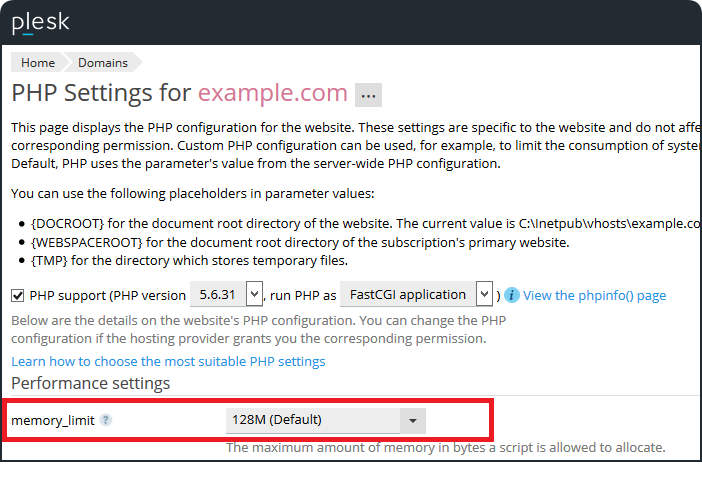
-
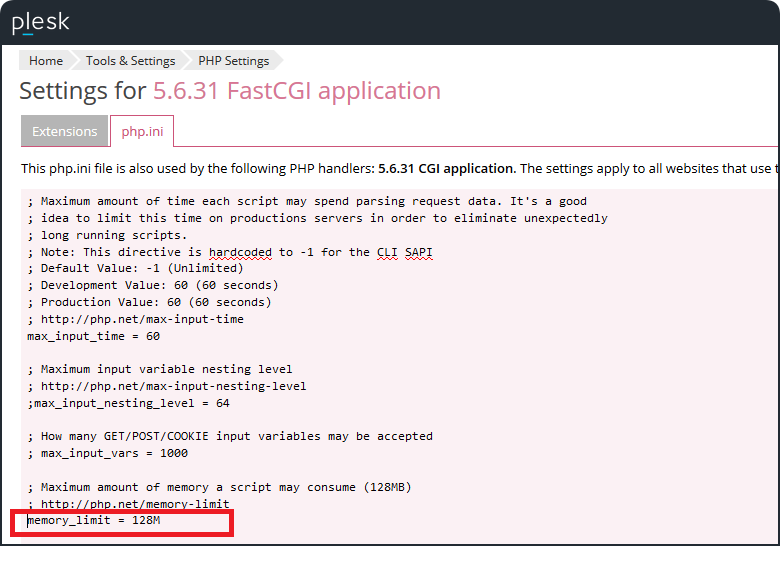
To change the
memory_limitglobally, go to Plesk > Tools & Settings > PHP Settings > PHP handler > php.ini > find memory_limit and type the new value, e.g. 128M.Note: These settings will be only applied to the domains configured with the default value.
-
