Key Takeaway
- As a leading web server management platform, Plesk simplifies complex infrastructure management. It allows hosting providers to deliver secure, high-performance web environments.
- You must align your business with the appropriate Plesk edition to smoothly match your server’s administrative capabilities with your expanding client roster.
- From basic single-server setups to full-scale reseller networks, Plesk provides zero-risk mobility to upgrade or downgrade your licensing as your model evolves.
Select the Plesk version that can grow with your infrastructure and clientele. Choose Web Admin for simple personal websites (up to 10 domains), Web Pro for developers managing up to 30 domains in bulk, or Web Host for reseller account sales and limitless domain hosting.
Most hosting businesses do not stay the same size for long. A freelancer managing five sites moves to twenty-five. A small studio starts fielding requests for client logins and separate billing. A hosting provider outgrows manual account setup and needs resellers.
Each stage brings its own pain point. Too few domains, and you are paying for upgrades every few months. No reseller tools, and you are stuck creating every client account manually. This happens when your edition stops matching your workload.
The trick is knowing which edition matches where your business actually is. Plesk was built around that reality. Instead of a single fixed plan, it offers three editions, each tailored to a different stage of growth.
3 Plesk Editions for Your Hosting Business
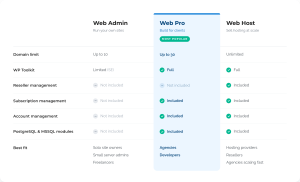
Plesk offers three editions, each built for a different stage of growth. Apart from price, the real difference lies in how many domains you can manage, how much WordPress automation you get, and whether you can offer hosting to your own clients as a reseller.
Here’s a closer look at each one.
Plesk Web Admin Edition
Web Admin is the starting point. It is built for basic site and domain management. There are no reseller layers and bulk automation. If you are running your own sites or a handful of client projects, this covers what you need.
Plesk Web Pro Edition
Web Pro is made for freelancers and small studios doing serious client work. You get the full WP Toolkit, so you can clone, stage, update, and secure WordPress sites at scale instead of logging into each site one at a time.
Plesk Web Host Edition
Web Host is built for people running a hosting business. It adds reseller management, subscription management, and account management. These are the tools you need once clients want their own logins and billing tiers.
Here is a quick table for feature comparison –
Matching the Edition to Your Pain Points
As your hosting business grows, two pain points tend to show up first. Here’s how each one points to a different edition.
The Domain and Workload Squeeze
Domain limits are usually the first squeeze. Managing 15 WordPress sites solo already feels tight on the Web Admin’s 10-domain cap. Add manual updates on top, since Web Admin only ships a limited version of WP Toolkit, and hours disappear fast.
This is the exact gap Web Pro closes. Full WP Toolkit means bulk updates, staging, and security checks from one screen. The 30-domain ceiling buys room to grow without hitting another wall in six months. The cost step up from Web Admin is modest, and it pays for itself the first time you skip a manual update across a dozen sites.
The Client Account Squeeze
Client account requests are the second squeeze. Once clients want their own dashboards and separate billing, you are either building it manually or looking at Web Host. It is the only edition with built-in reseller management, so sub-accounts, permissions, and client self-service come standard, without a support ticket every time.
Subscription and account management remove the spreadsheet from your onboarding process. Unlimited domains means you stop counting altogether. This matters once new clients arrive weekly instead of monthly.
How to Choose the Right Edition
Ask yourself three questions:
- How many domains do I manage right now, and how many in 12 months?
- Do any of my clients need their own separate login and billing?
- Am I spending hours a week on manual WordPress updates?
If you will be managing fewer than 10 domains and are unsure about future goals, start with Web Admin. If your domain count is climbing past 10 and WordPress maintenance eats your week, Web Pro fits. If clients need their own accounts and you are building recurring hosting revenue, Web Host is built for exactly that.
Pro Tip: You can upgrade or downgrade between editions whenever your business needs change.
Scale With the Right Edition
Web Admin keeps things lean for small setups. Web Pro gives freelancers and studios the automation to scale client work. Web Host hands hosting providers the reseller backbone to grow a real business on top of Plesk. Always remember, the right edition is the one that matches your next 12 months.
Ready to see which edition fits? Compare Plesk Editions or start a free trial today.


No comment yet, add your voice below!