When a subscription is created, a user account for the subscription
owner is created along with it. This is the account that you use to log
in to Plesk. You can perform any operations for which the hosting
provider has granted permissions. However, you may want to give another
person - for example, another employee of your organization, or a
contractor - access to Plesk so that they may perform some operation.
But what if you do not want them to have full control over your
subscription while they are logged in?
In this case, you can create additional users who will be able to log in
to Plesk and have access to certain, predefined functionality, such as
creating mailboxes, managing databases, or performing backups. The
functionality available to additional users is determined by creating,
configuring, and assigning user roles to additional users.
To create an additional user account, go to Users > User
Accounts and click Create User Account.
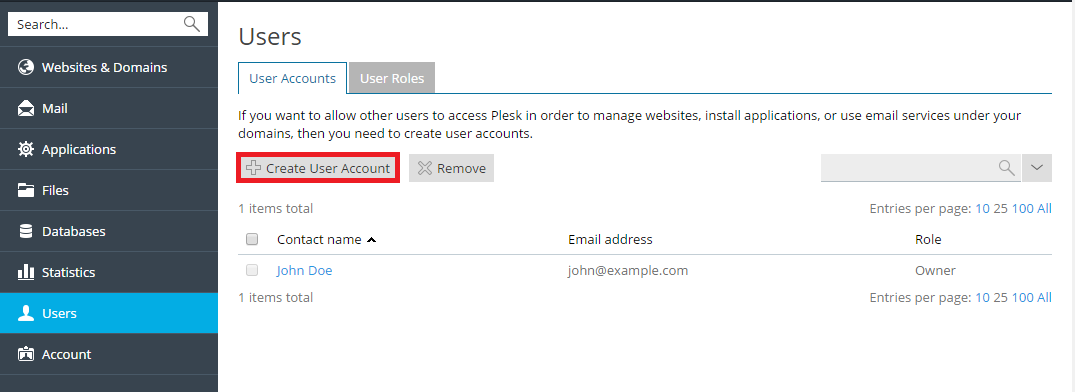
You will need to provide details such as the user’s contact name, email,
username, and password. You should pay particular attention to the
following settings:
-
User role. You need to select one of the pre-configured user
roles from the menu to assign it to the user. User roles determine
what Plesk functionality is available to the user once they log in.
User roles are explained further in this topic. -
Access to subscriptions. If your customer account has more than
one subscription assigned to it, you can enable the user to see and
manage either all of them or a single subscription of your choice. -
User is active. If this checkbox is cleared, the user will be
unable to log in to Plesk. By default the checkbox is selected. If
you need to disable an additional user account without removing it,
go to Users > User Accounts, click the user you want to
disable, click Change Settings and clear the User is active
checkbox.
User roles are used to define what Plesk functionality is available to
additional users. Every additional user must have a user role assigned
to them, and every role includes a set of permissions that determine
what operations users who are assigned that role can perform in Plesk.
To create a user role, go to Users > User Roles and click
Create User Role.